  • Admissions

    Find Your Path

    Admissions
    How to apply and what you need to get in
    Undergraduate Admissions
    First-time freshmen applying to LSU New Orleans
    Transfer Admissions
    Transfer credits, eligibility, and next steps
    Adult Learners
    Evening, weekend, and part-time options
    Military Admissions
    GI Bill®, Yellow Ribbon, and VA resources
    Graduate Admissions
    Graduate programs, requirements, deadlines
    International Admissions
    International student requirements and resources

    Apply & Enroll

    Apply
    Start your application to LSU New Orleans
    Important Dates & Deadlines
    Fall, spring, and summer enrollment windows
    Tuition & Fees
    In-state and out-of-state rates, mandatory fees
    Accepted Students
    Next steps after your acceptance letter
    Privateer Enrollment Center
    One-stop shop for enrollment, advising, financial aid, and registration
    Veterans Services
    GI Bill®, Yellow Ribbon, and VA resources

    Plan Your Visit

    ‍

    Visit Us
    Schedule a campus tour or open house
    Virtual Tour
    Explore campus from anywhere
    Open Houses
    Upcoming events for prospective students

    Financial Aid

    Financial Aid Overview
    Meeting the cost of your education is an important part of your success
    Types of Aid
    Grants, loans, work-study, and scholarships overview
    Cost of Education
    Understanding your full cost of attendance
    Scholarships & Awards
    Understanding your full cost of attendance
    Resources
    Step-by-step FAFSA guide

    Also See

    Explore Majors
    Browse 70+ programs and find your path
    Graduate Programs
    Master's and doctoral degrees
    Life on Campus
    Housing, dining, and student organizations
    Start Your FAFSA
    Key Deadlines
    Academic Calendar
    Contact Admissions
    For Parents
  • Academics

    Colleges & Schools

    Academics
    Degrees and programs the school offers
    All Colleges
    Browse every college and school at LSU New Orleans
    College of Liberal Arts & Education
    Humanities, education, social sciences, and fine arts
    Henry Bernstein College of Business Administration
    Business, hospitality, and tourism management programs
    Dr. Robert A. Savoie College of Engineering
    Civil, electrical, mechanical, and naval architecture programs
    College of Sciences
    Biology, chemistry, physics, mathematics, and computer science
    School of Interdisciplinary Studies
    Interdisciplinary degrees and customized study plans
    The Graduate School
    Graduate programs, requirements, and resources

    Programs

    Undergraduate Programs
    Majors, minors, and degree paths
    Graduate Programs
    Master's, doctoral, and professional degrees
    Online Degree Programs
    Fully online credentials
    Certificates
    Professional and academic certificates
    Honors Program
    Enriched curriculum for high-achieving students
    Professional and Continuing Education (PaCE)
    Non-credit, professional, and continuing education programs
    Pre-Professional Programs
    Pre-med, pre-law, and other pre-professional tracks

    Research & Discovery

    Research at LSU New Orleans
    Funded research, centers, and institutes
    Student Research
    Undergraduate and graduate research programs
    Study Abroad
    International programs and exchanges
    International Center
    Study abroad advising and international student services
    Faculty & Staff Research
    Funding opportunities and research support for faculty
    Collaborate with LSU New Orleans
    Industry, community, and government partnerships
    Office of Research
    Research administration and compliance

    Also See

    Academic Calendar
    Key dates, registration windows, and university holidays
    General Education
    Core curriculum requirements
    Testing Services
    CLEP, DSST, and faculty testing
    Program Search
    Course Catalog
    Registrar Office
    Academic Calendar
  • About

    About LSU New Orleans

    About LSU New Orleans
    Our story, mission, and New Orleans identity
    Mission & Vision
    What we stand for, where we are going
    History
    From LSU New Orleans (1958) to today
    At a Glance
    Enrollment, rankings, and fast facts
    Current Rankings
    U.S. News, Forbes, Princeton Review
    Looking for UNO?
    We are LSU New Orleans.

    Leadership & Offices

    Office of the President
    University leadership and presidential office
    Administrative Offices
    All university offices and departments
    University Advancement
    Fundraising, development, and giving
    Work at LSU New Orleans
    Job openings and employment opportunities
    News
    Latest from LSU New Orleans

    Community & Engagement

    Alumni
    Connect with the LSU New Orleans alumni community
    For Parents
    Resources for student families
    Service Learning
    Community-engaged learning and volunteer opportunities
    Make a Gift
    Support LSU New Orleans

    Contact & Resources

    Contact LSU New Orleans
    Find the right office or person
    Campus Map
    Interactive and downloadable campus map
    Title IX
    Reporting, resources, and policies
    Campus Safety
    University Police Department and crime statistics
    Non-Discrimination Policy
    Equal access and opportunity for everyone.
    Accessibility
    Find support or report an accessibility barrier.
    Contact
    Campus Map
    Careers
    Make a Gift
    Alumni
    For Faculty and Staff
    Privateer Athletics
  • Student Life

    Living on Campus

    Student Life
    Things to do and ways to get involved on campus
    Residential Life
    On-campus housing options and applications
    Apply for Housing
    Housing application portal
    Dining Services
    Meal plans, dining locations, and hours
    Housing Rates
    Room costs by hall type and contract
    Pontchartrain Halls
    On-campus residence halls
    Lafitte Village
    Apartment-style living
    Campus Recreation
    Fitness center, intramurals, and open recreation

    Get Involved

    Student Involvement & Leadership
    Hub for campus engagement and organizations
    Student Organizations
    Clubs, groups, and organizations directory
    Greek Life
    Fraternities and sororities
    First Year Experience
    Privateer Plunge and new student orientation
    Service Learning
    Community-engaged learning and volunteer opportunities

    Health & Wellness

    Campus Health Services
    Medical care, counseling, and wellness
    Title IX Resources
    Reporting options and support resources
    Student Accountability
    Student conduct and community standards
    International Center
    Study abroad advising and international student services

    Career & Success

    Career Services
    Jobs, internships, and career coaching
    Student & Alumni Resources
    Resume help, recruiting, and job boards
    Research Opportunities
    Undergraduate and graduate research programs
    Study Abroad
    International programs and exchanges

    Also See

    Academic Advising
    Meet your advisor and plan your path
    Campus Map
    Find buildings, parking, and services
    Graduation Information
    Commencement, cap & gown, ceremony details
    Transcript Request
    Request official or unofficial transcripts
    Social Media
    Follow LSU New Orleans online
    Housing Portal
    Campus Health
    Student Organizations
    Career Center
    Current Students
    Privateer Athletics
  • visit
    visit
  • apply
    apply
  • Admissions

    Find Your Path

    Admissions
    How to apply and what you need to get in
    Undergraduate Admissions
    First-time freshmen applying to LSU New Orleans
    Transfer Admissions
    Transfer credits, eligibility, and next steps
    Adult Learners
    Evening, weekend, and part-time options
    Military Admissions
    GI Bill®, Yellow Ribbon, and VA resources
    Graduate Admissions
    Graduate programs, requirements, deadlines
    International Admissions
    International student requirements and resources

    Apply & Enroll

    Apply
    Start your application to LSU New Orleans
    Important Dates & Deadlines
    Fall, spring, and summer enrollment windows
    Tuition & Fees
    In-state and out-of-state rates, mandatory fees
    Accepted Students
    Next steps after your acceptance letter
    Privateer Enrollment Center
    One-stop shop for enrollment, advising, financial aid, and registration
    Veterans Services
    GI Bill®, Yellow Ribbon, and VA resources

    Plan Your Visit

    ‍

    Visit Us
    Schedule a campus tour or open house
    Virtual Tour
    Explore campus from anywhere
    Open Houses
    Upcoming events for prospective students

    Financial Aid

    Financial Aid Overview
    Meeting the cost of your education is an important part of your success
    Types of Aid
    Grants, loans, work-study, and scholarships overview
    Cost of Education
    Understanding your full cost of attendance
    Scholarships & Awards
    Understanding your full cost of attendance
    Resources
    Step-by-step FAFSA guide

    Also See

    Explore Majors
    Browse 70+ programs and find your path
    Graduate Programs
    Master's and doctoral degrees
    Life on Campus
    Housing, dining, and student organizations
    Start Your FAFSA
    Key Deadlines
    Academic Calendar
    Contact Admissions
    For Parents
  • Academics

    Colleges & Schools

    Academics
    Degrees and programs the school offers
    All Colleges
    Browse every college and school at LSU New Orleans
    College of Liberal Arts & Education
    Humanities, education, social sciences, and fine arts
    Henry Bernstein College of Business Administration
    Business, hospitality, and tourism management programs
    Dr. Robert A. Savoie College of Engineering
    Civil, electrical, mechanical, and naval architecture programs
    College of Sciences
    Biology, chemistry, physics, mathematics, and computer science
    School of Interdisciplinary Studies
    Interdisciplinary degrees and customized study plans
    The Graduate School
    Graduate programs, requirements, and resources

    Programs

    Undergraduate Programs
    Majors, minors, and degree paths
    Graduate Programs
    Master's, doctoral, and professional degrees
    Online Degree Programs
    Fully online credentials
    Certificates
    Professional and academic certificates
    Honors Program
    Enriched curriculum for high-achieving students
    Professional and Continuing Education (PaCE)
    Non-credit, professional, and continuing education programs
    Pre-Professional Programs
    Pre-med, pre-law, and other pre-professional tracks

    Research & Discovery

    Research at LSU New Orleans
    Funded research, centers, and institutes
    Student Research
    Undergraduate and graduate research programs
    Study Abroad
    International programs and exchanges
    International Center
    Study abroad advising and international student services
    Faculty & Staff Research
    Funding opportunities and research support for faculty
    Collaborate with LSU New Orleans
    Industry, community, and government partnerships
    Office of Research
    Research administration and compliance

    Also See

    Academic Calendar
    Key dates, registration windows, and university holidays
    General Education
    Core curriculum requirements
    Testing Services
    CLEP, DSST, and faculty testing
    Program Search
    Course Catalog
    Registrar Office
    Academic Calendar
  • About

    About LSU New Orleans

    About LSU New Orleans
    Our story, mission, and New Orleans identity
    Mission & Vision
    What we stand for, where we are going
    History
    From LSU New Orleans (1958) to today
    At a Glance
    Enrollment, rankings, and fast facts
    Current Rankings
    U.S. News, Forbes, Princeton Review
    Looking for UNO?
    We are LSU New Orleans.

    Leadership & Offices

    Office of the President
    University leadership and presidential office
    Administrative Offices
    All university offices and departments
    University Advancement
    Fundraising, development, and giving
    Work at LSU New Orleans
    Job openings and employment opportunities
    News
    Latest from LSU New Orleans

    Community & Engagement

    Alumni
    Connect with the LSU New Orleans alumni community
    For Parents
    Resources for student families
    Service Learning
    Community-engaged learning and volunteer opportunities
    Make a Gift
    Support LSU New Orleans

    Contact & Resources

    Contact LSU New Orleans
    Find the right office or person
    Campus Map
    Interactive and downloadable campus map
    Title IX
    Reporting, resources, and policies
    Campus Safety
    University Police Department and crime statistics
    Non-Discrimination Policy
    Equal access and opportunity for everyone.
    Accessibility
    Find support or report an accessibility barrier.
    Contact
    Campus Map
    Careers
    Make a Gift
    Alumni
    For Faculty and Staff
    Privateer Athletics
  • Student Life

    Living on Campus

    Student Life
    Things to do and ways to get involved on campus
    Residential Life
    On-campus housing options and applications
    Apply for Housing
    Housing application portal
    Dining Services
    Meal plans, dining locations, and hours
    Housing Rates
    Room costs by hall type and contract
    Pontchartrain Halls
    On-campus residence halls
    Lafitte Village
    Apartment-style living
    Campus Recreation
    Fitness center, intramurals, and open recreation

    Get Involved

    Student Involvement & Leadership
    Hub for campus engagement and organizations
    Student Organizations
    Clubs, groups, and organizations directory
    Greek Life
    Fraternities and sororities
    First Year Experience
    Privateer Plunge and new student orientation
    Service Learning
    Community-engaged learning and volunteer opportunities

    Health & Wellness

    Campus Health Services
    Medical care, counseling, and wellness
    Title IX Resources
    Reporting options and support resources
    Student Accountability
    Student conduct and community standards
    International Center
    Study abroad advising and international student services

    Career & Success

    Career Services
    Jobs, internships, and career coaching
    Student & Alumni Resources
    Resume help, recruiting, and job boards
    Research Opportunities
    Undergraduate and graduate research programs
    Study Abroad
    International programs and exchanges

    Also See

    Academic Advising
    Meet your advisor and plan your path
    Campus Map
    Find buildings, parking, and services
    Graduation Information
    Commencement, cap & gown, ceremony details
    Transcript Request
    Request official or unofficial transcripts
    Social Media
    Follow LSU New Orleans online
    Housing Portal
    Campus Health
    Student Organizations
    Career Center
    Current Students
    Privateer Athletics
  • visit
    visit
  • apply
    apply
  • visit
    visit
  • apply
    apply
LSU New Orleans Logo
  • LSU New Orleans
  • center for teaching innovation
  • canvas
IN THIS SECTION
  • Teaching and Learning
    • Tutorials and Workshop Recordings
    • Teaching and Learning Tools
    • Accessibility
    • Course Evaluation
    • Moodle
    • Contact Us

CANVAS

LSU New Orleans uses Canvas as our learning management system (LMS) to deliver course content. Instructors of online, hybrid and classroom-based courses configure their Canvas course shells to deliver content including syllabi, policies and information, lectures, assignments, discussions, quizzes and exams, chats, and grades.

Students participate by receiving lecture content in various formats, submitting assignments, communicating with their instructors and classmates, and accessing grades.

CANVAS LOGIN


Canvas is part of our campus single sign-on system, meaning if you’re logged into your LSU New Orleans email, you’re logged into Canvas, and vice versa. You can log in from any Canvas link on LSU New Orleans website, from a Moodle tile on your myapps.uno.edu page, or by going directly to uno.instructure.com. 


Frequently Asked Questions

Read the answers to frequently asked questions about Canvas. Some of these links lead to brief tutorials on an external support site. Please ignore any references to webinars and training sessions - instead, contact us via email or at (504) 280-5512 for training.
  • I'm lost! How do I get started with Canvas?

    The best way to get started with Canvas is to use LSU New Orleans's QuickStart Guide! You can also check out LSU New Orleans's Canvas Training Playlist and sign-up for upcoming Canvas training. You should also check out our guides and resources by clicking directly below this on "What guides or resources does LSU New Orleans have to help me with Canvas?"
  • What's my Canvas username?

    Your Canvas username is your LSU New Orleans email address. Your password is your email password. If you are logged in to your email, you should already be logged in to Canvas. If you are having problem with logging in and/or passwords, please call the University Communications & Computing Center at (504) 280-4357 for help.

  • How do I find my courses? 

    You can see your courses on the Dashboard page which appears after you login to Canvas. If you have older courses, you may need to click Courses from Canvas global navigation.

    If your students cannot see your course in their Dashboard, make sure you have published your course. If your course is published and they still don't see your course, and it has been more than 24 hours since they enrolled in Webstar, have them email [email protected].

  • How do I import an old Canvas course or a Canvas master course into a new course?

    If you had course content migrated for you from Moodle into a master course, you can use the Canvas guide on Using the Canvas Course Import tool.  

    If you did not request Fall course migration, you can import your course from Moodle using LSU New Orleans's Moodle to Canvas Import Guide.

  • Will my course content from Moodle be in Canvas?

    If you had course content migrated for you from Moodle into a master course, you can use the Canvas guide on Using the Canvas Course Import tool.  To see what's imported, look at our Canvas White Glove Migrated Course Equivalents. The intention is that you can use your master course as the course shell you edit and update before importing year after year. That way, you will never lose your course or wonder what the last version of it you worked on was.

    If you did not request Fall course migration, you can import your course from Moodle using LSU New Orleans's Moodle to Canvas Import Guide. To see what will import and what will not, look at our White Glove Migration vs. Moodle Backup Import Chart.

    Either way, we recommend you check due dates, quiz questions, and overall fidelity in your Canvas course.

    The CTI will be creating a migration spreadsheet for all non-Fall courses that are still left in Moodle. Information about that spreadsheet will be sent out in early-mid Fall 2023.

  • What's a master course? How do I use it?

    A master course is a version of your course that you can keep updated and import from semester after semester. The intention is that you can use your master course as the course shell you edit and update before importing. That way, you will never lose your course or wonder what the last version of it you worked on was. Your master course will never be taken off of Canvas. You can use it as a course development sandbox or just a way to keep your course information in an easily accessible spot. 

    If you had course content migrated for you from Moodle into a master course, you can use the Canvas guide on Using the Canvas Course Import tool to bring your master course content into your current semester's course. 

    If you did not request Fall course migration, you can email [email protected] to ask for a master course.
    The CTI will be creating a migration spreadsheet for all non-Fall courses that are still left in Moodle. Information about that spreadsheet will be sent out in early-mid Fall 2023. Those courses will be imported into master courses, as well.

  • How do I add my Syllabus?

    Since every course is required to have a syllabus uploaded to Canvas, this one is important! Use the Editing a Syllabus in Canvas guide to help you add the required syllabus to your Canvas course.

  • How do I contact my students before the semester starts?

    For Fall 2023, please use the Canvas Inbox to send course messages before the semester starts. Best practice is to put a copy of that email in your course Announcements, as well. Once the semester starts, you can use Announcements as normal. This may change in future semesters.

    Send a course message using the Canvas Inbox (Note: We suggest clicking the "Send an individual message to each recipient" for course emails.)

  • Why can't my students see my course material?

    In Canvas, there are three levels of information, all of which need to be published (made visible) before your students can access your course content. Canvas assumes you want your material unpublished until you are ready to make it available to students.

    1. Course level - Course are automatically published on the date set by the university and published on the Academic Calendar. If you want students to have access before this date, you will need to publish your course manually.
    2. Module level - Modules need to be published before they can be seen. Even if the content within a module is published, it will not show to students until the module, itself, has been published. Learn how to publish a module by reading the Canvas guide on module publishing.
    3. Content level - All content and material needs to be published before students can access it. Make sure all content is published. You may also need to add content to a module for students to access it, if you have not done that already.
      Change publish/unpublished status of module content
      Add course content to a module
  • How do I add a Turn It In Assignment?

    Creating Turnitin Assignments in Canvas

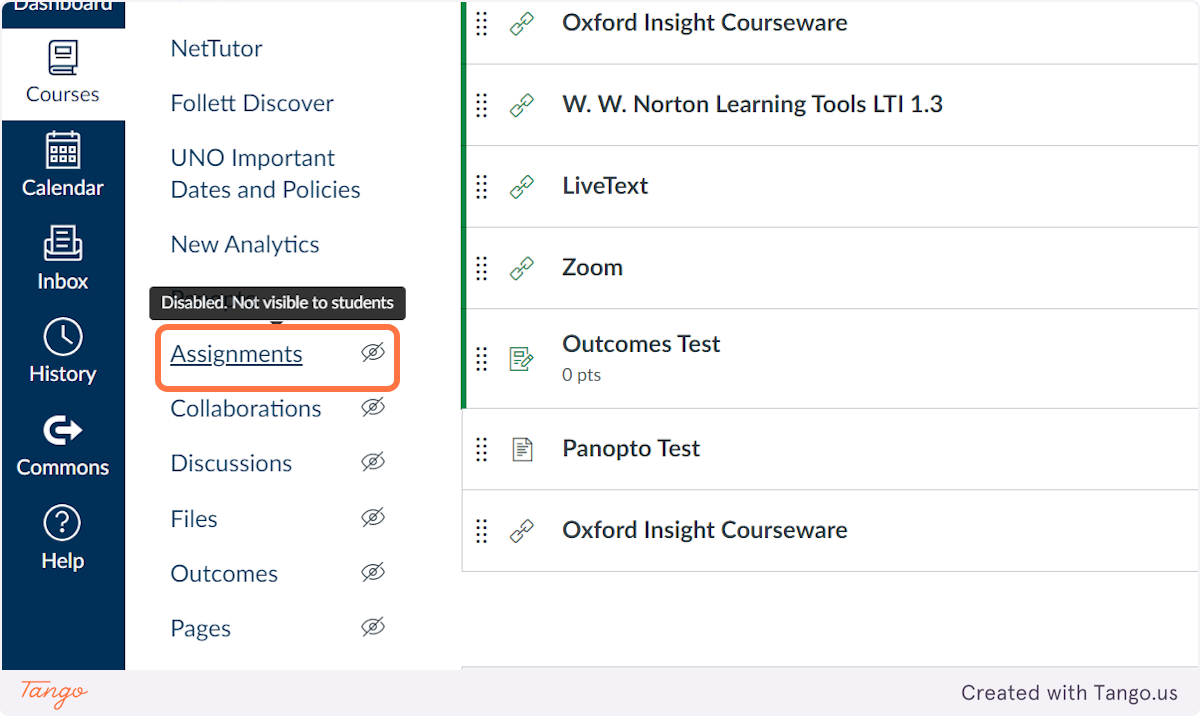
    1. In the left Course Navigation menu, click on Assignments

    In the left Course Navigation menu, click on Assignments

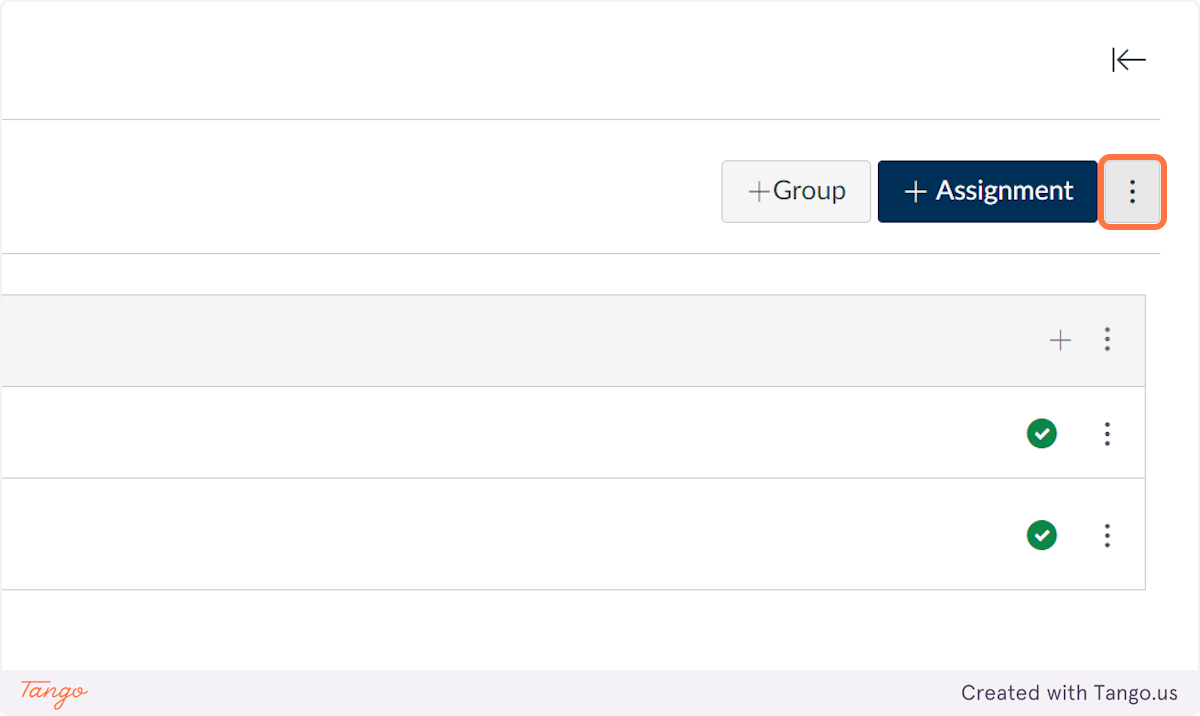
    2. Click on Assignments Settings (three dots next to +Assignment)

    Click on Assignments Settings (three dots next to +Assignment)

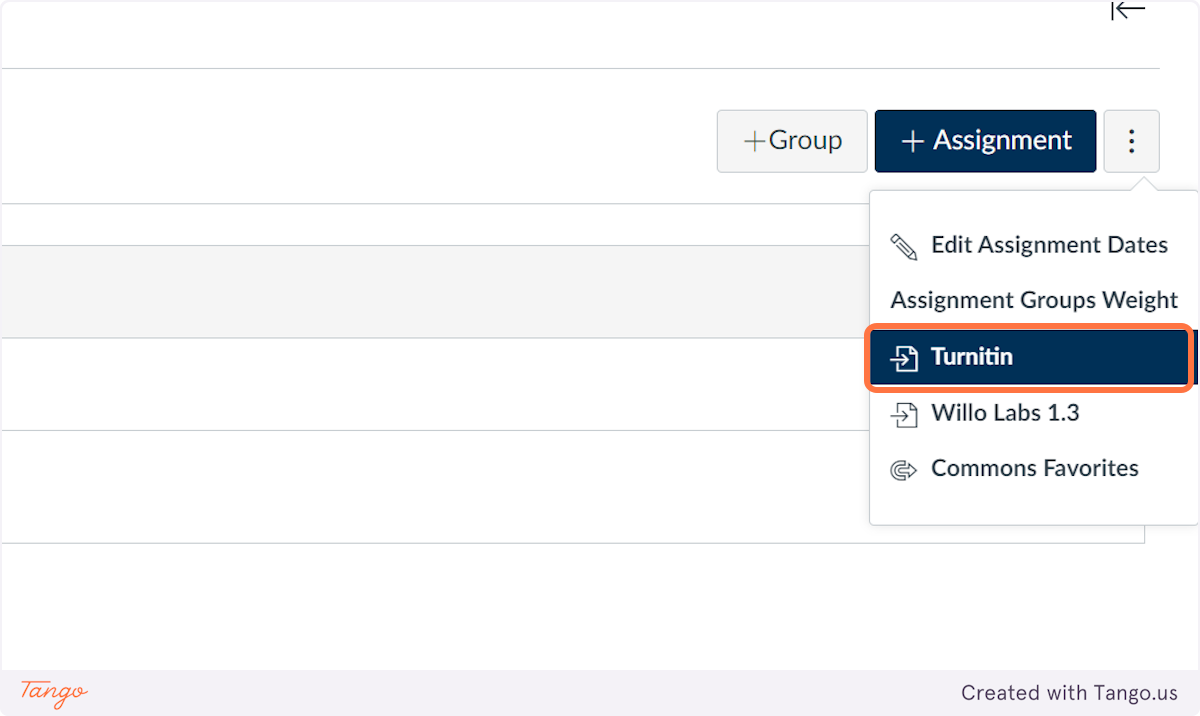
    3. Click on Turnitin

    Click on Turnitin

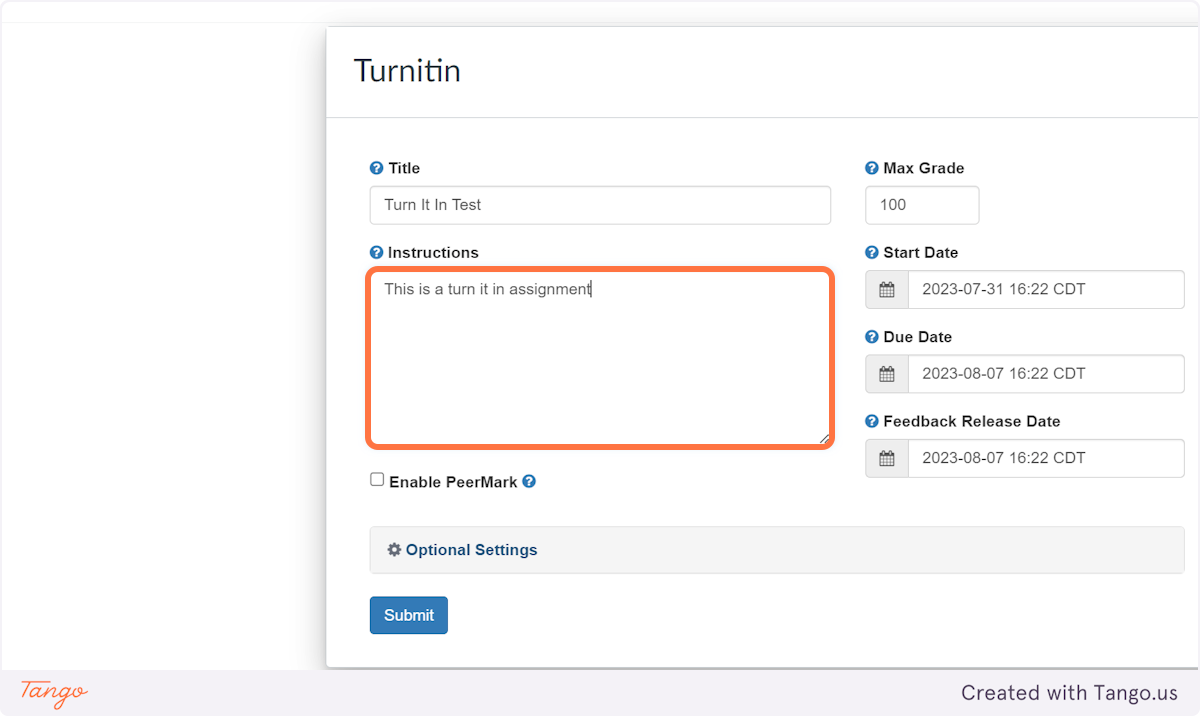
    4. Add your title and instructions

    Add your title and instructions

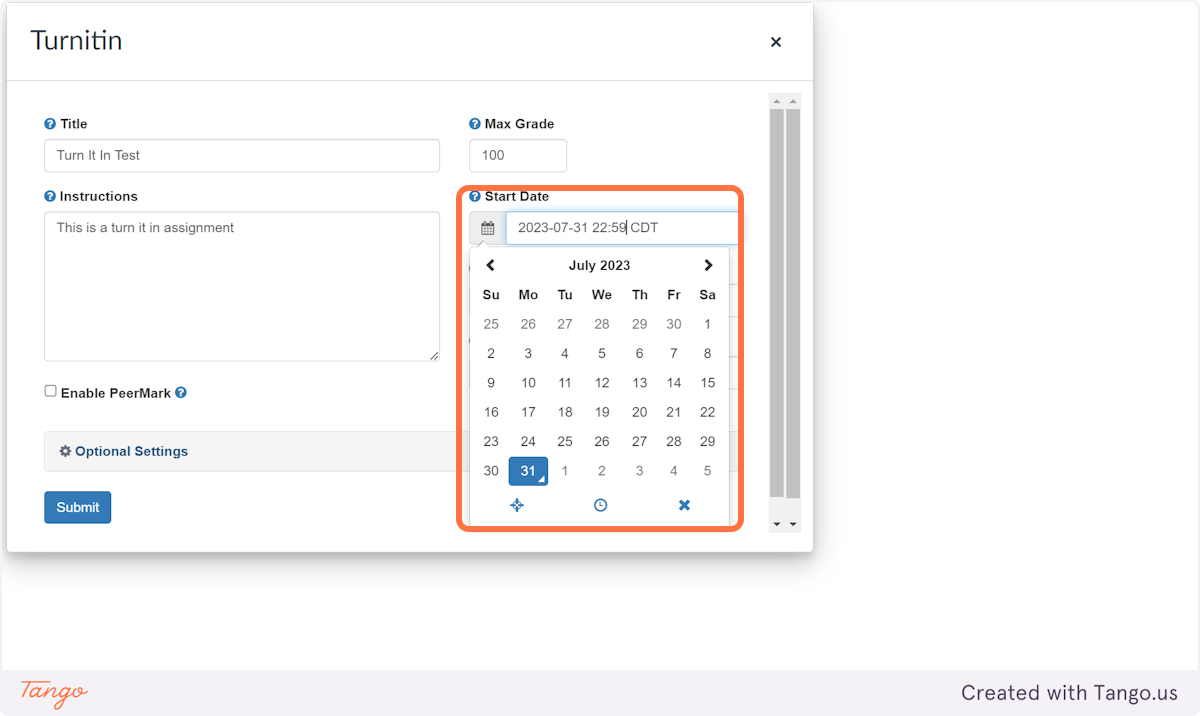
    5. Use the date and time pickers to set your Start Date, Due Date, and Feedback release date.

    Use the date and time pickers to set your Start Date, Due Date, and Feedback release date.

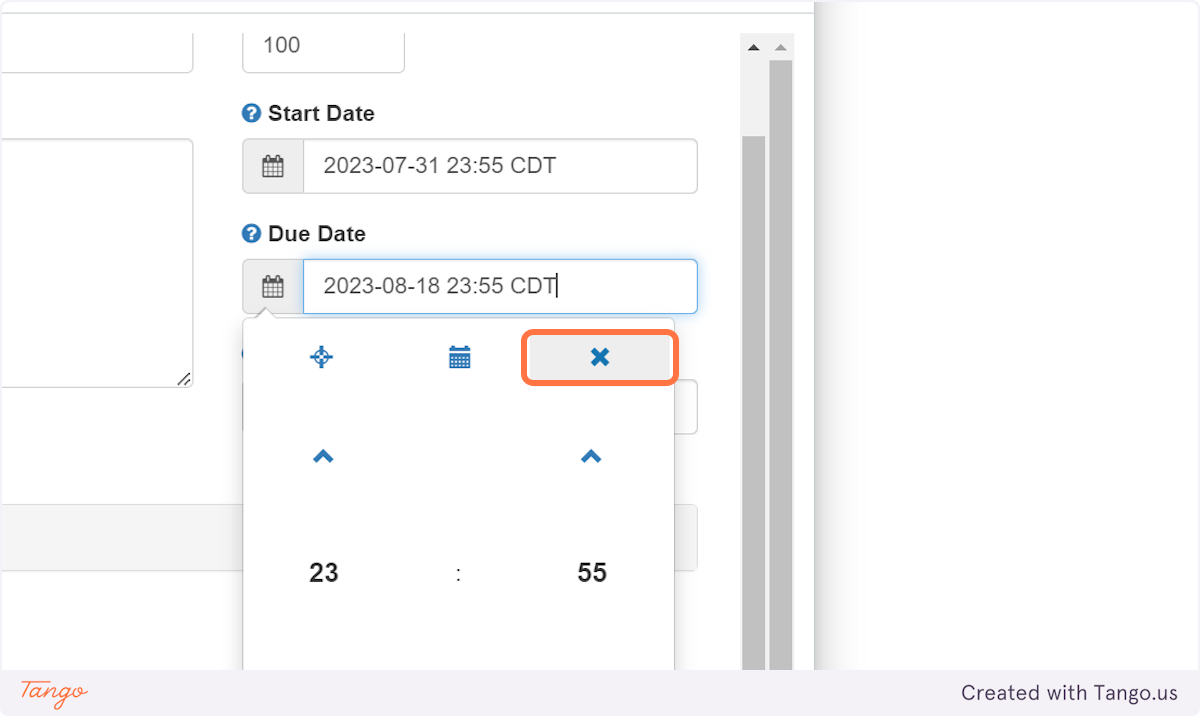
    6. Click the X in the picker to save your date and time.

    Click the X in the picker to save your date and time.

    7. Click on Optional Settings

    Click on  Optional Settings

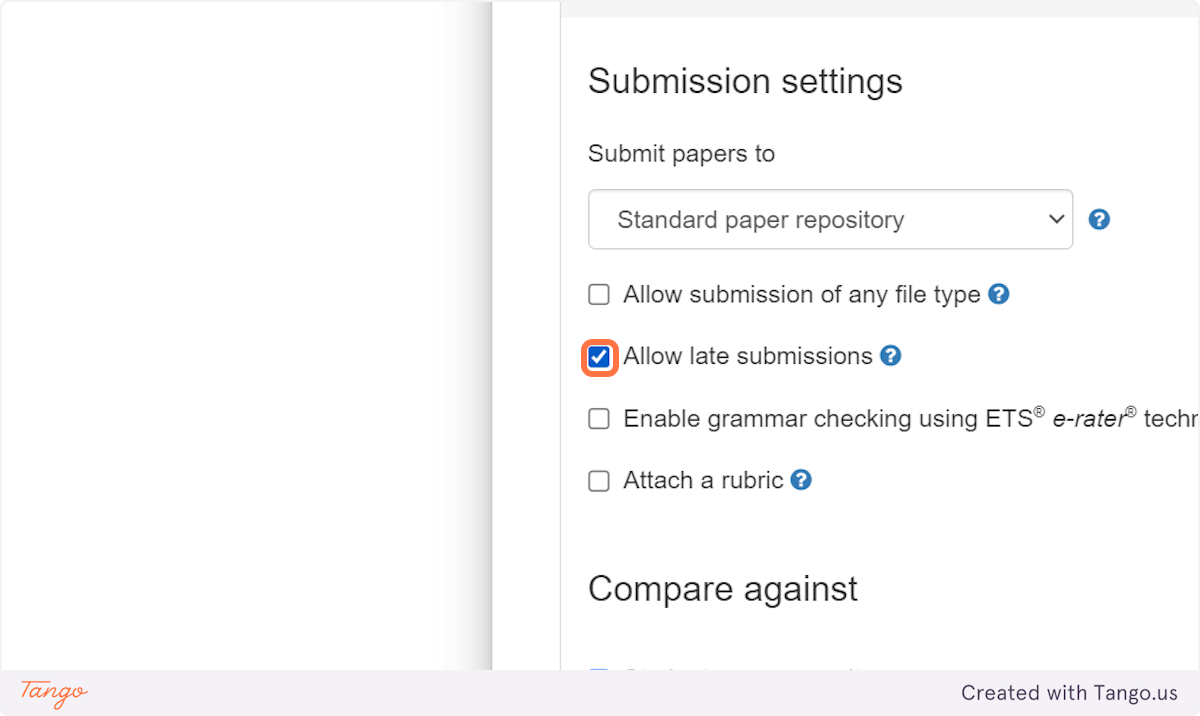
    8. If you want to allow submissions after the due date, check Allow late submissions

    If you want to allow submissions after the due date, check Allow late submissions

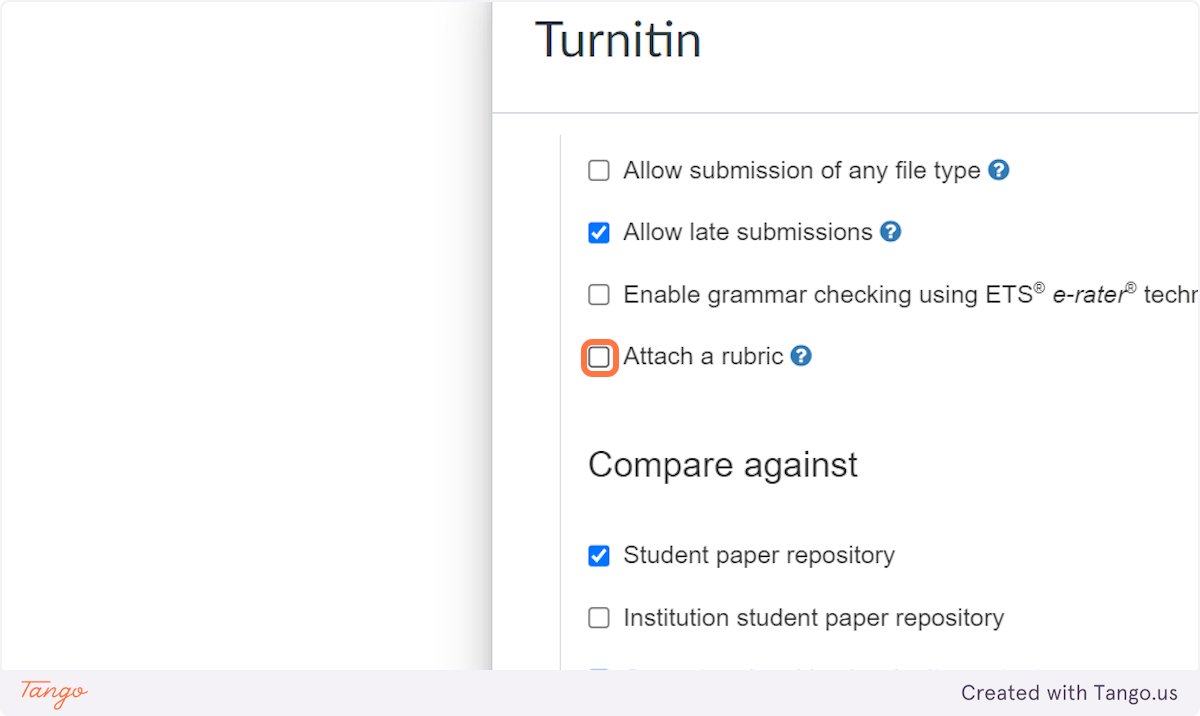
    9. If you want to attach a Turnitin rubric, click Attach a rubric

    If you want to attach a Turnitin rubric, click Attach a rubric

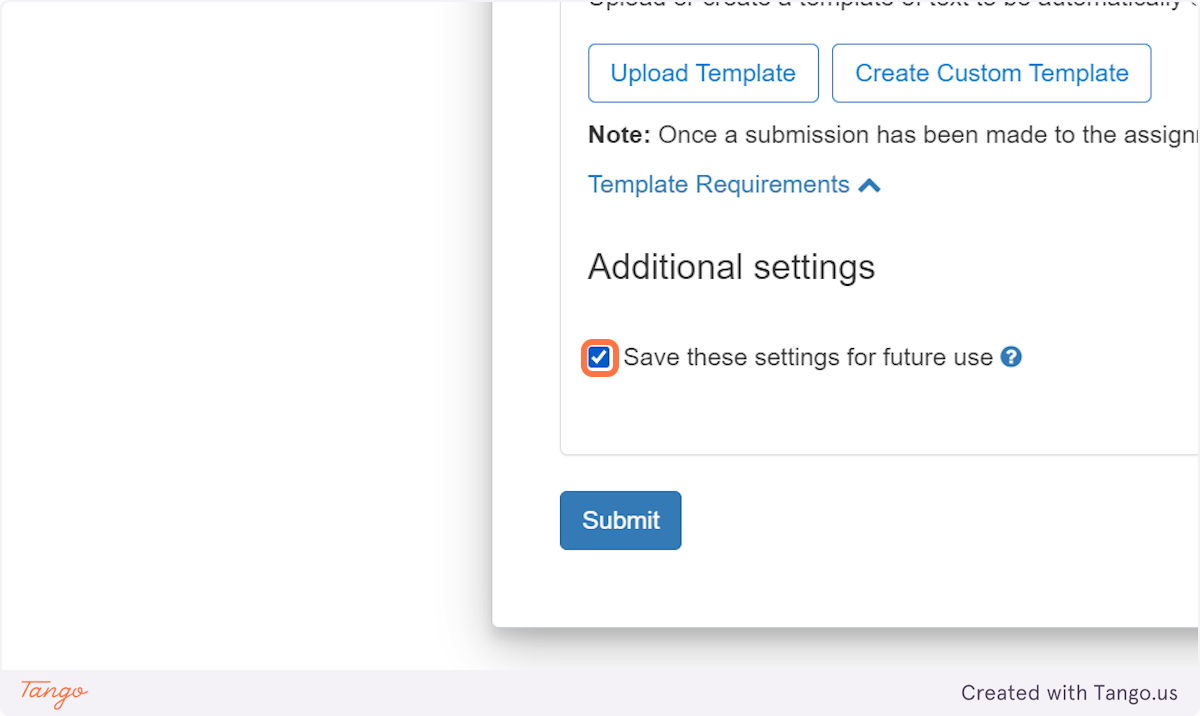
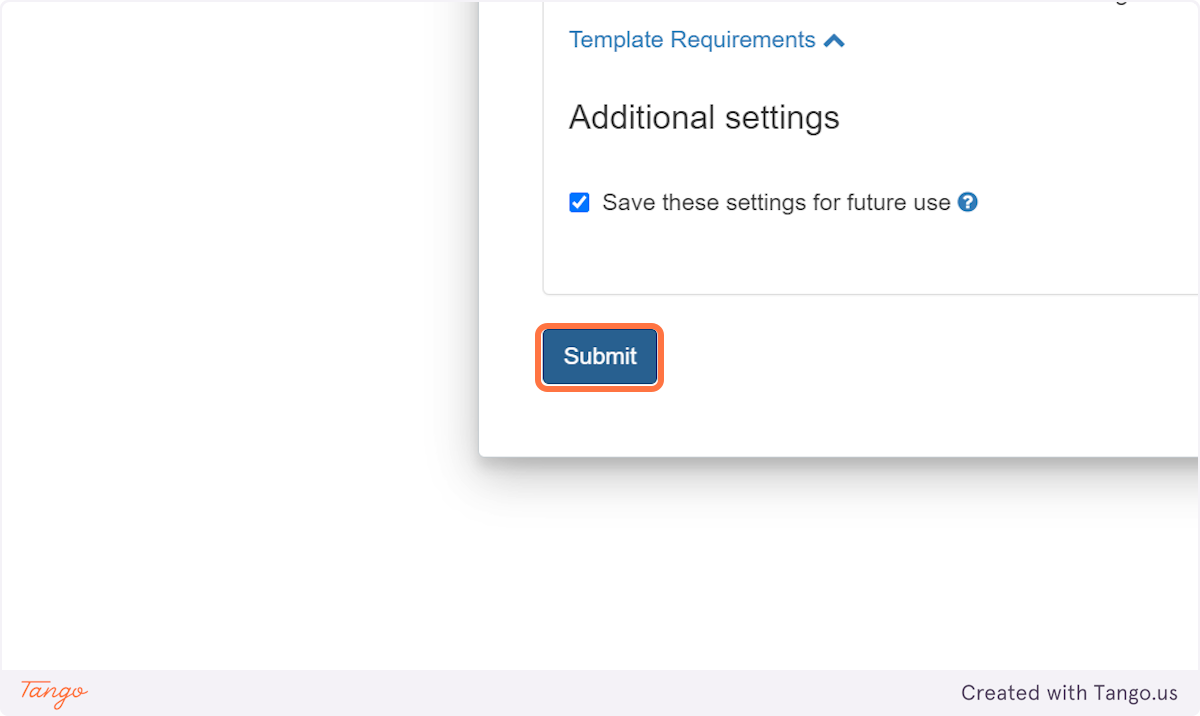
    10. To save yourself time in the future, check Save these settings for future use

    To save yourself time in the future, check Save these settings for future use

    11. Click on Submit

    Click on Submit

    12. Your Turnitin Assignment will appear in Assignments, but is not yet added to your Module

    Your Turnitin Assignment will appear in Assignments, but is not yet added to your Module

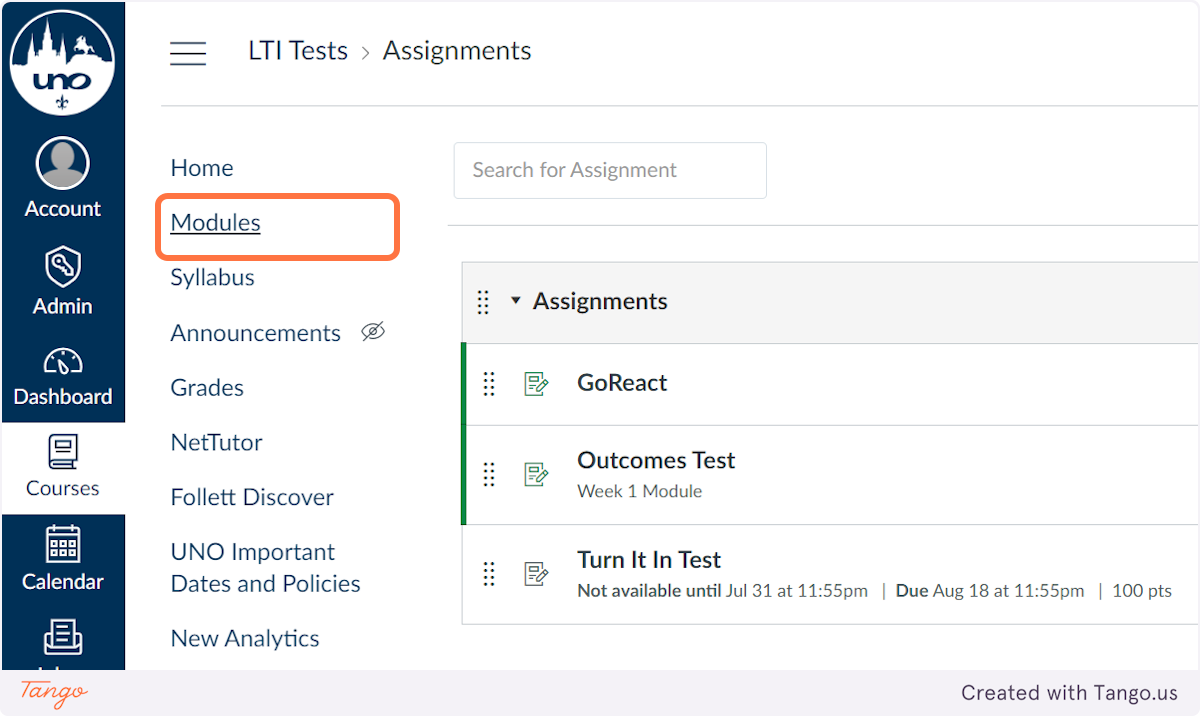
    13. Click on Modules

    Click on Modules

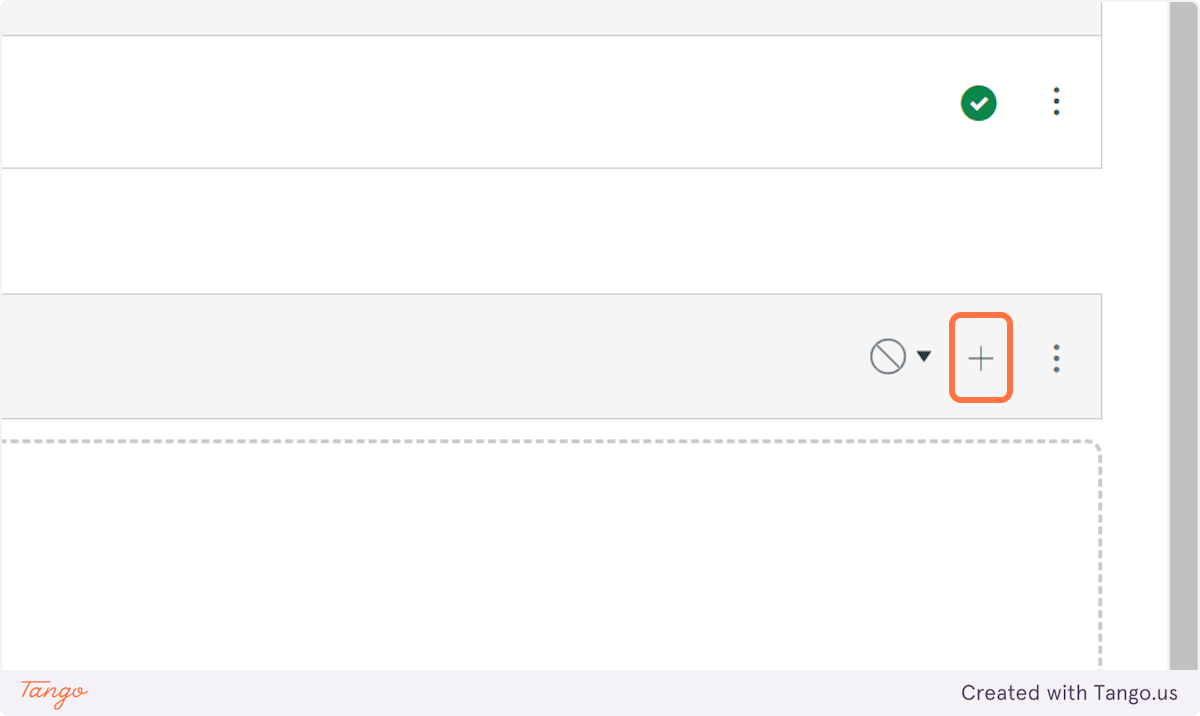
    14. Click on Add Content (the three dots) in in the module where you want your assignment to show up for your students

    Click on Add Content (the three dots) in in the module where you want your assignment to show up for your students

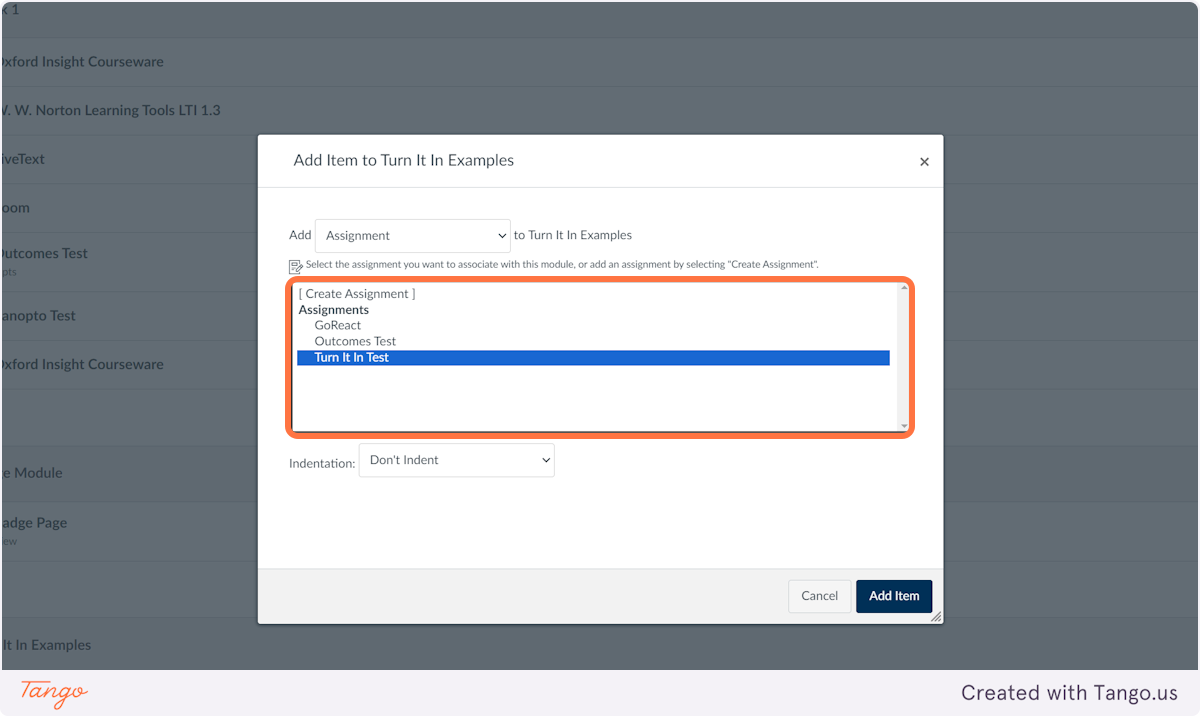
    15. Find your Turnitin Assignment in the Assignments list. Click on it.

    Find your Turnitin Assignment in the Assignments list. Click on it.

    16. Click on Add Item

    Click on Add Item

    17. Your Turnitin assignment is now added to your Canvas course and in the correct Module.

  • How do I enable Respondus LockDown Browser and Monitor?

    Enabling Respondus LockDown Browser and Monitor in Canvas

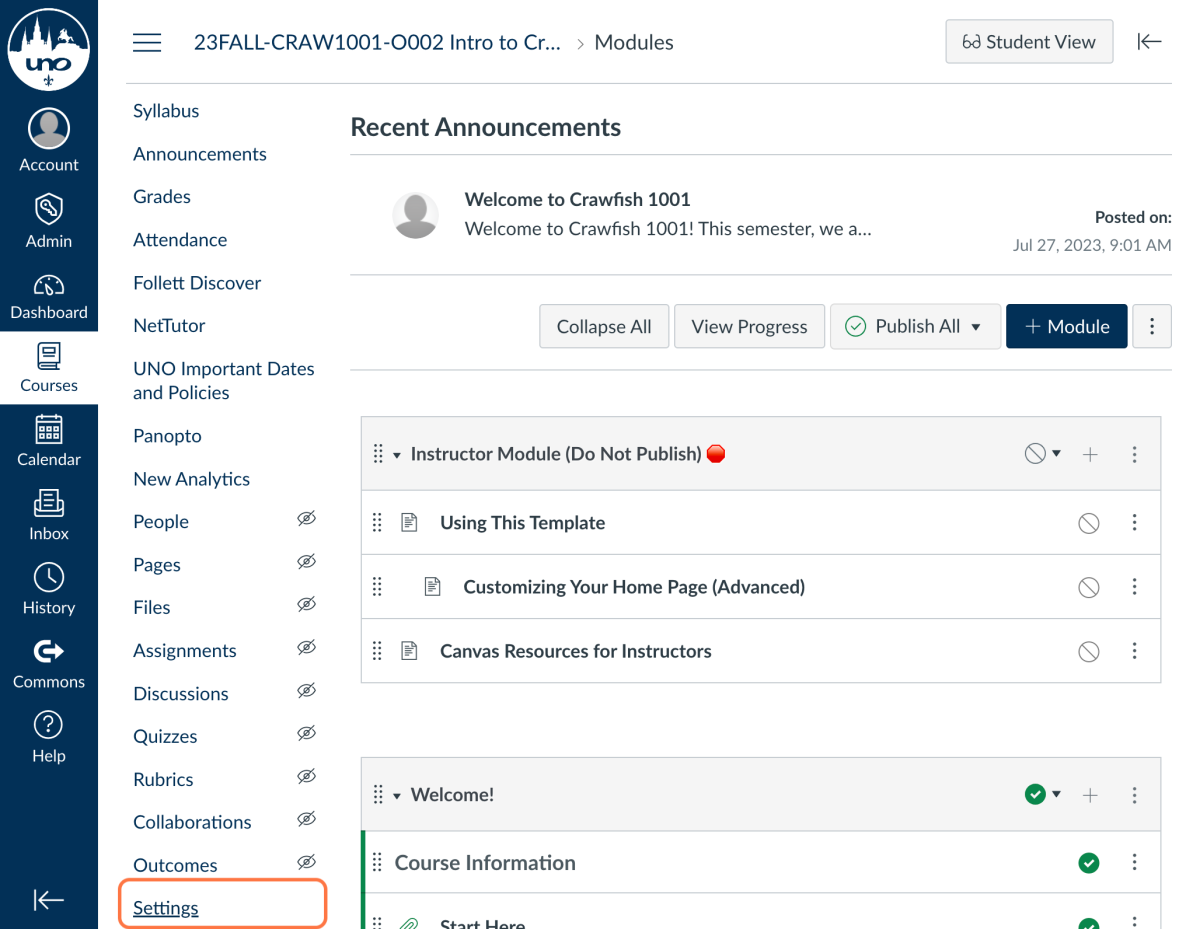
    1. In the left Course Navigation menu, click on Settings

    Canvas Course Navigation Menu with Settings highlighted

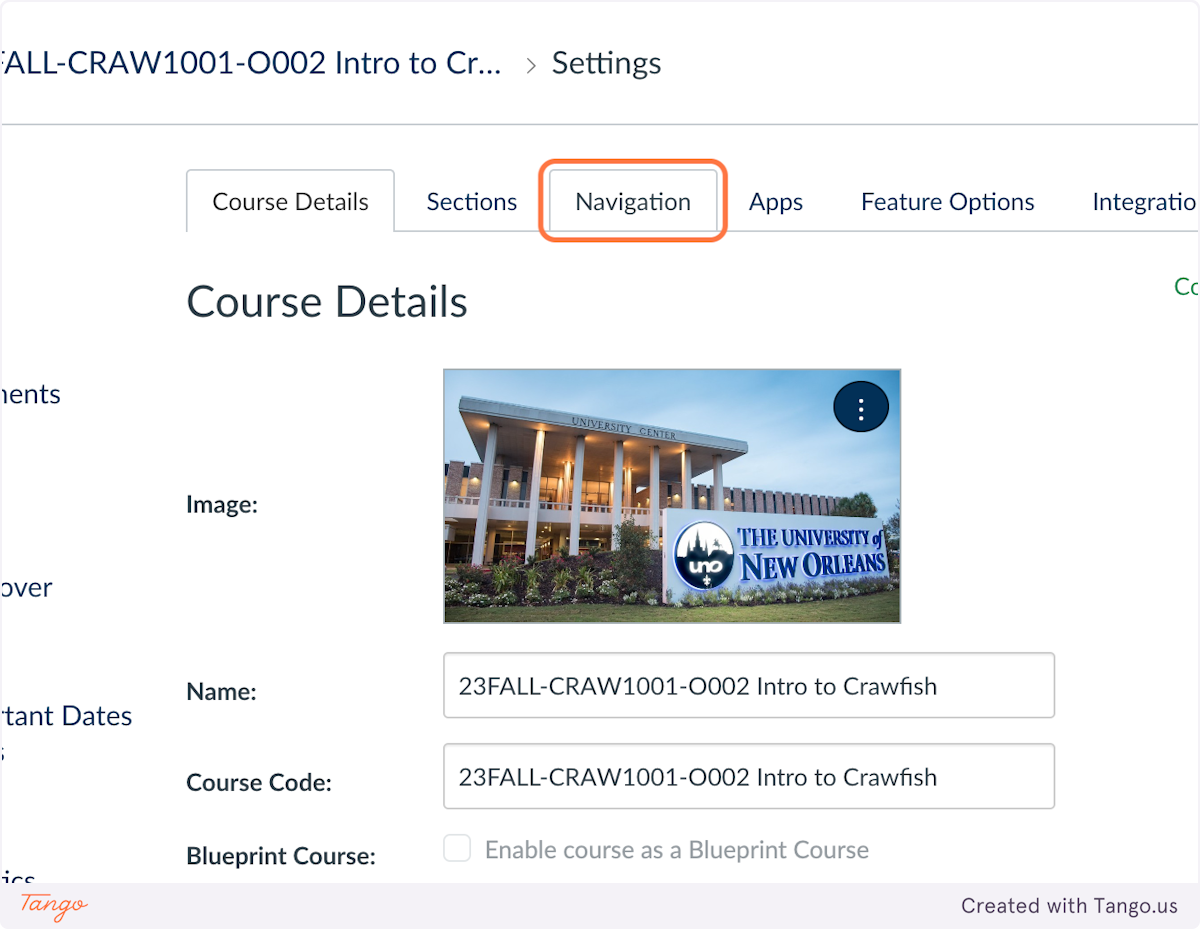
    2. Click on the Navigation tab

    Click on the Navigation tab

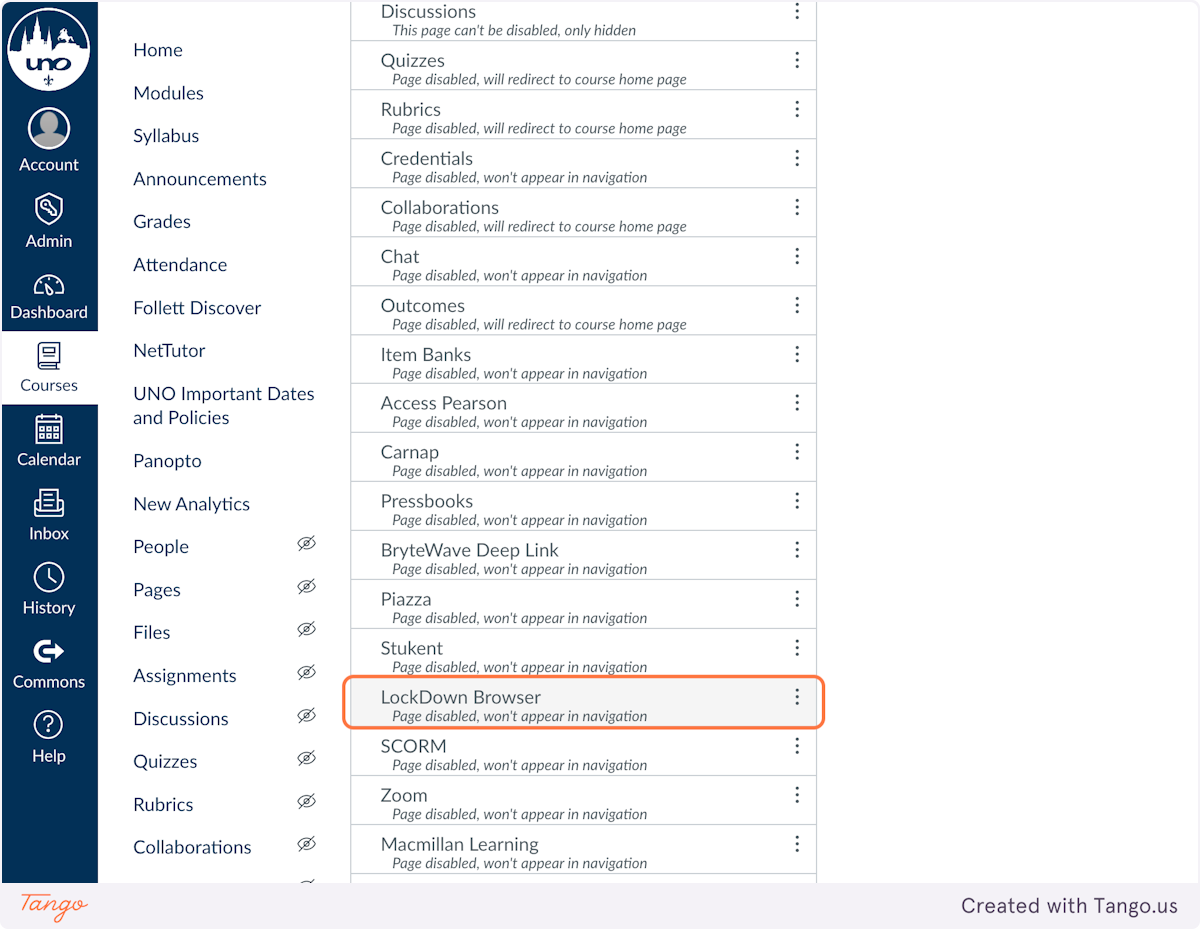
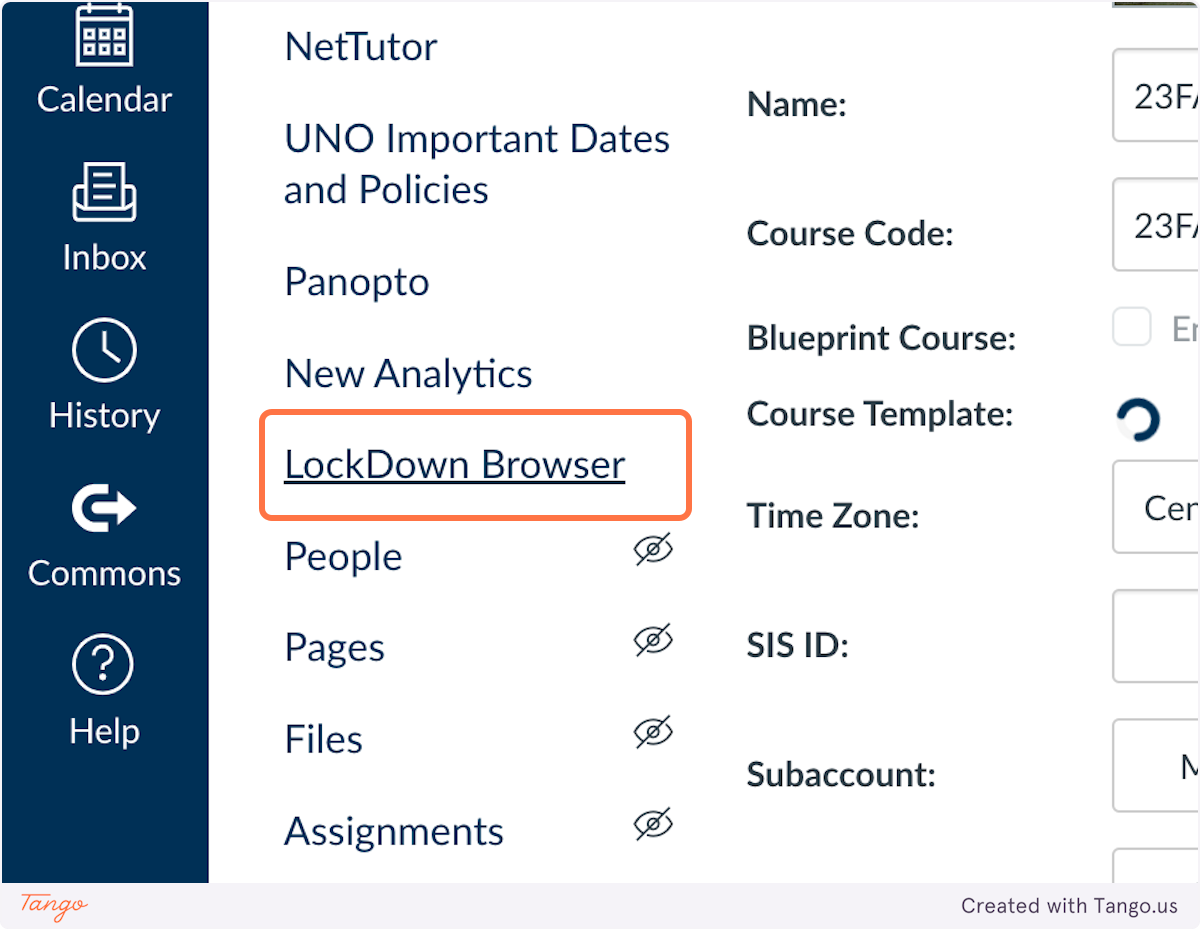
    3. Find LockDown Browser in the list of navigation items.

    Find LockDown Browser in the list of navigation items.

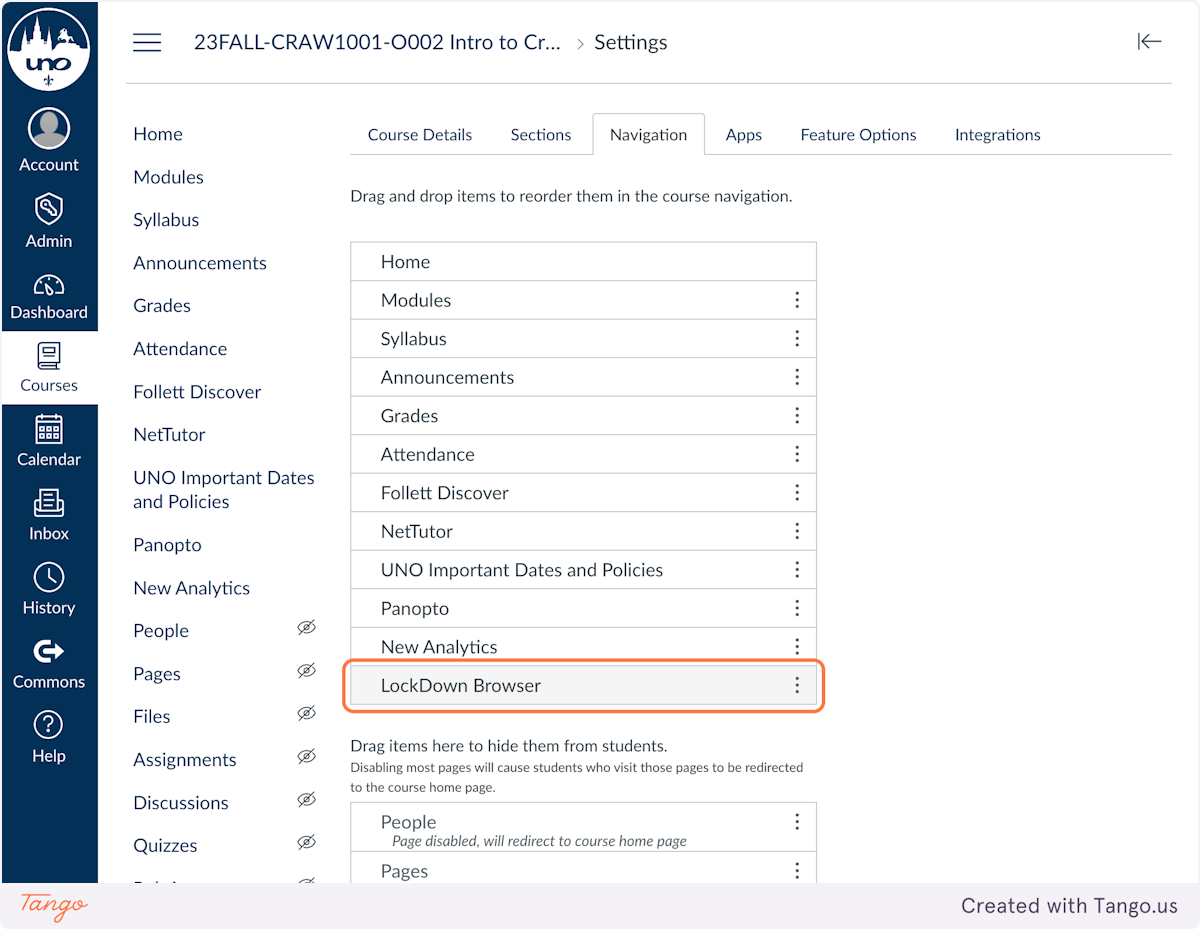
    4. Drag the LockDown Browser navigation item up into the enabled navigation area

    Drag the LockDown Browser navigation item up into the enabled navigation area

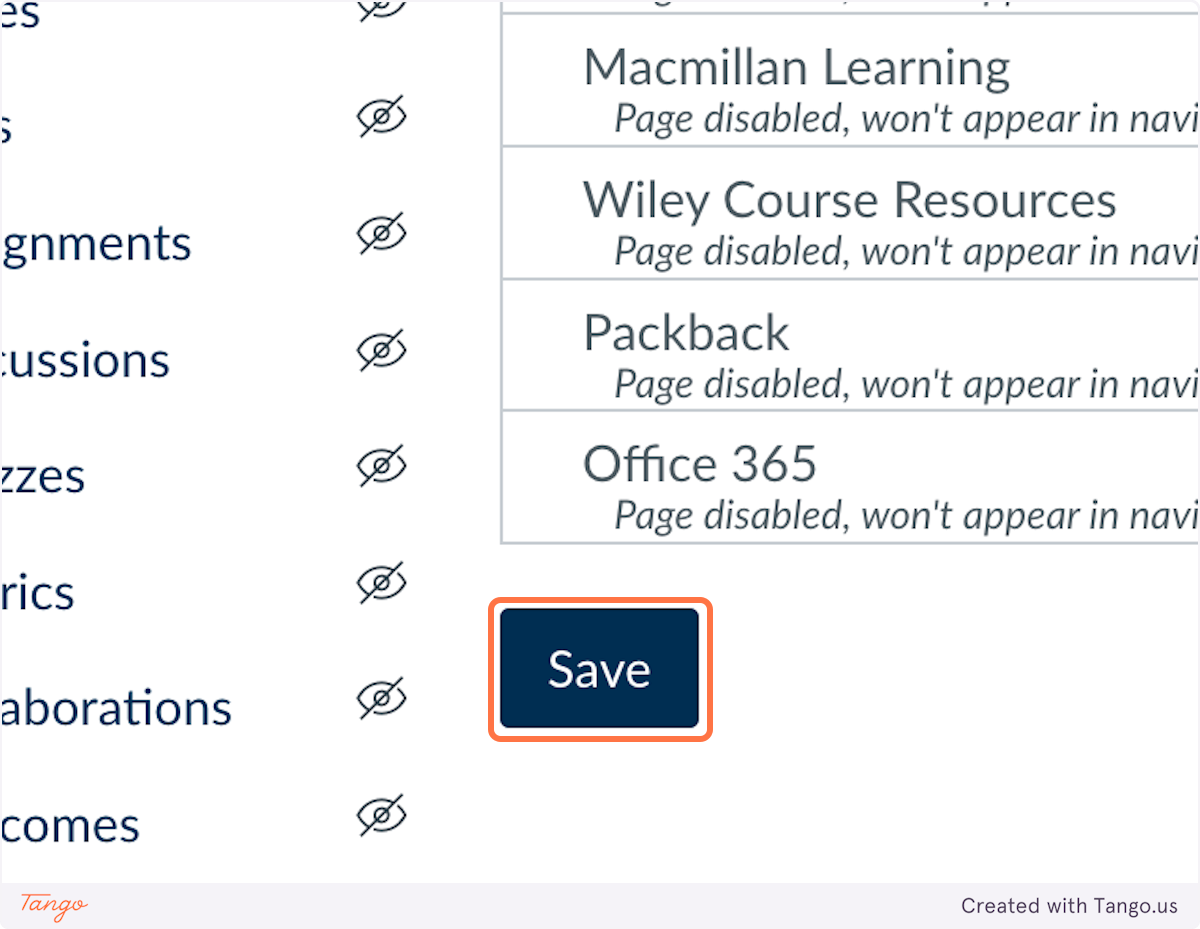
    5. Scroll down and click on Save

    Scroll down and click on Save

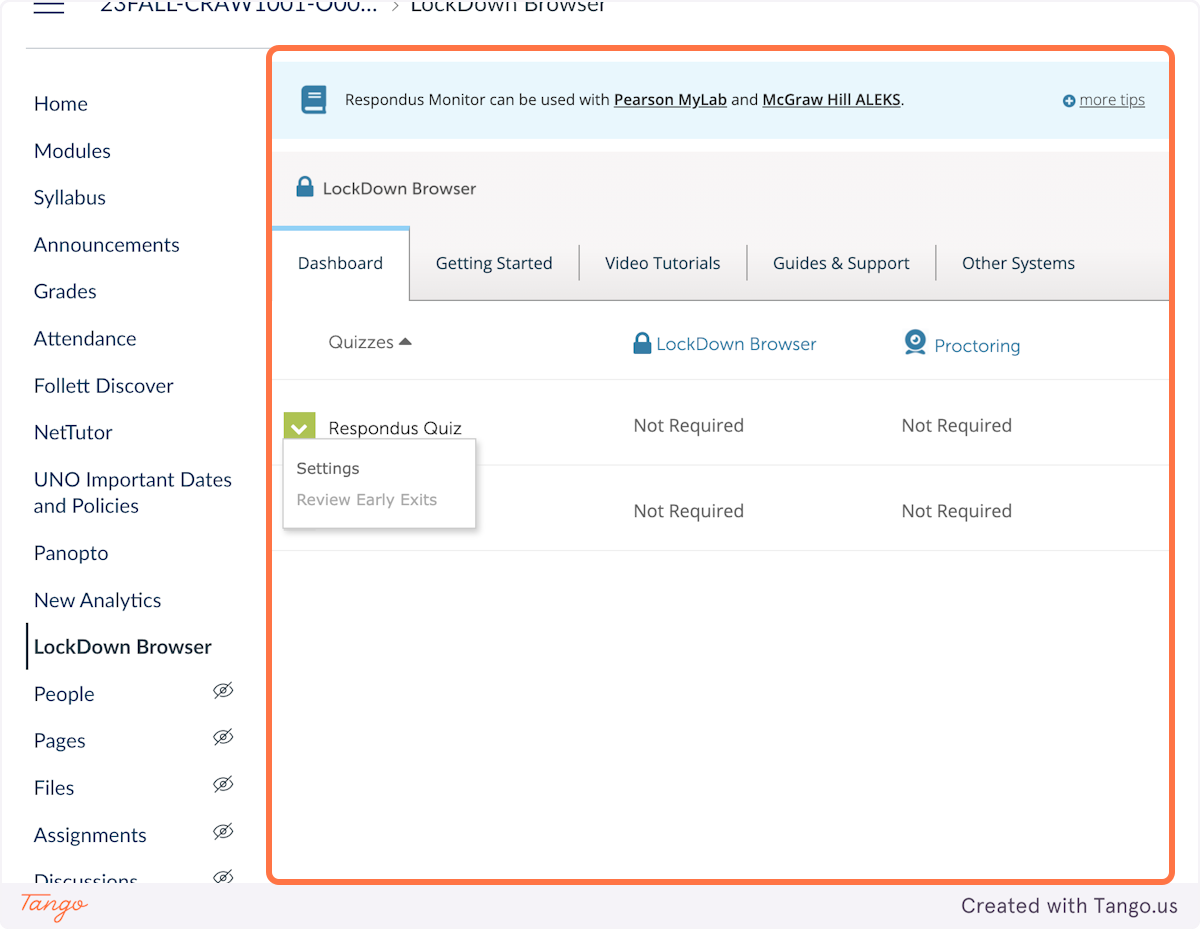
    6. Click on LockDown Browser in the left Course Navigation menu

    Click on LockDown Browser in the left Course Navigation menu

    7. Click on the dropdown menu to the left of the quiz you want to enable

    Click on the dropdown menu to the left of the quiz you want to enable

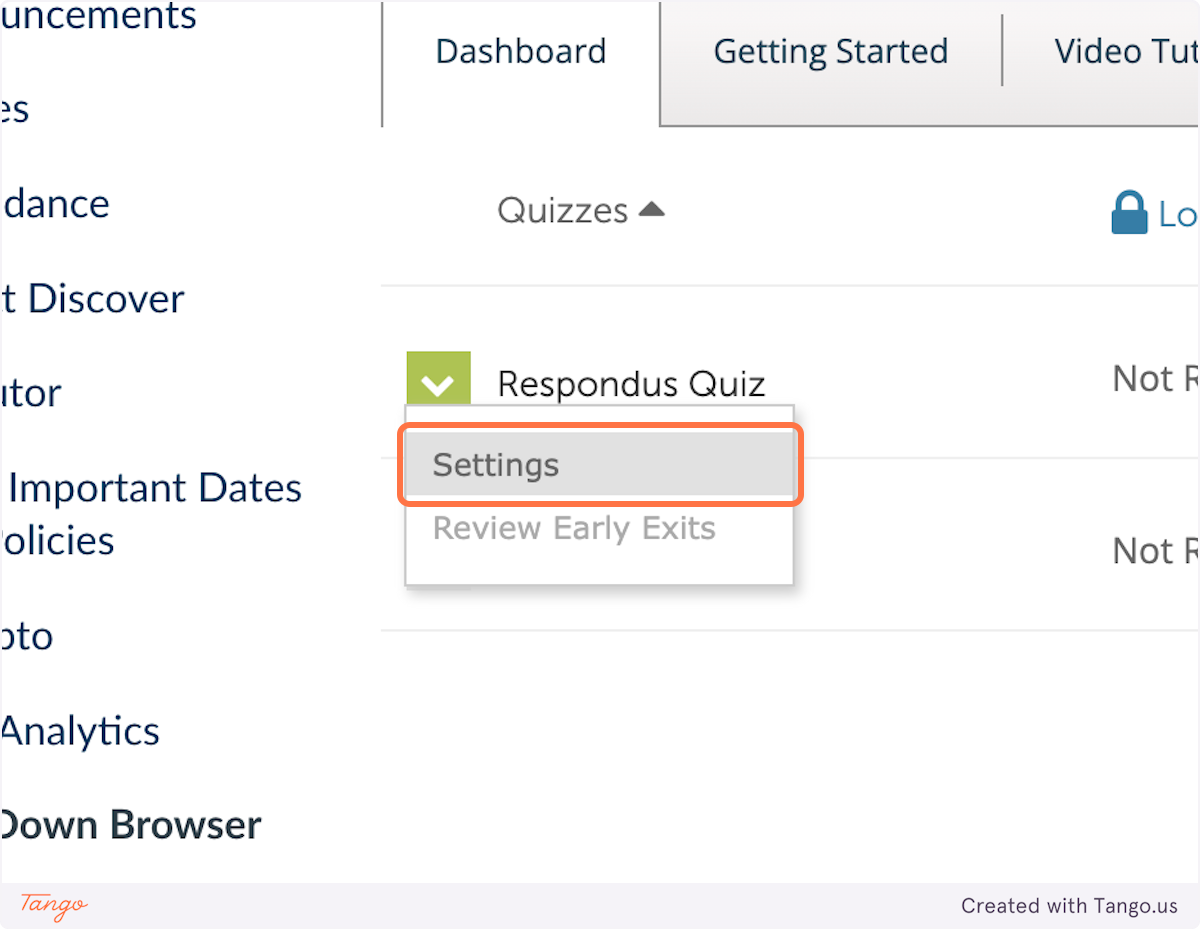
    8. Click on Settings

    Click on Settings

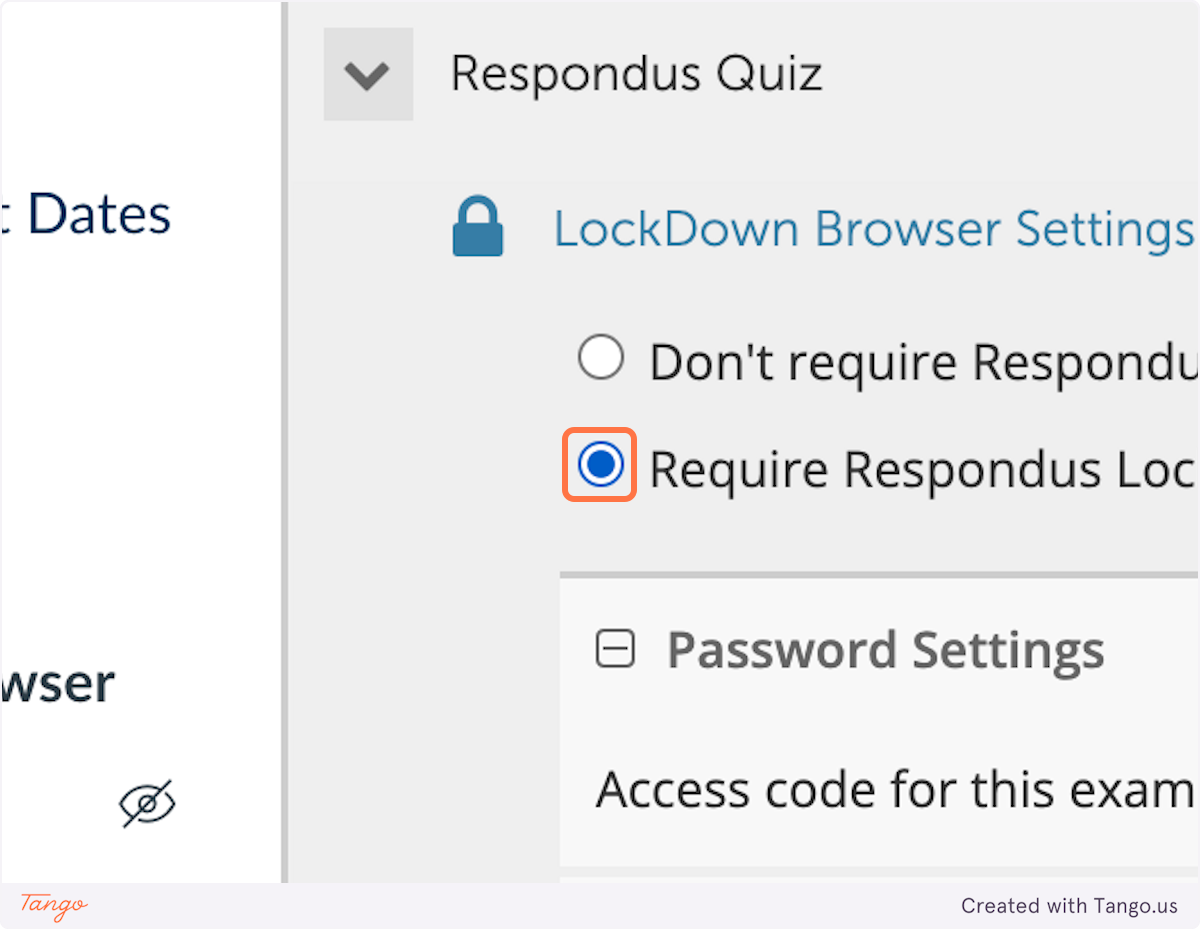
    9. Select Require Respondus LockDown Browser for this exam

    Select Require Respondus LockDown Browser for this exam

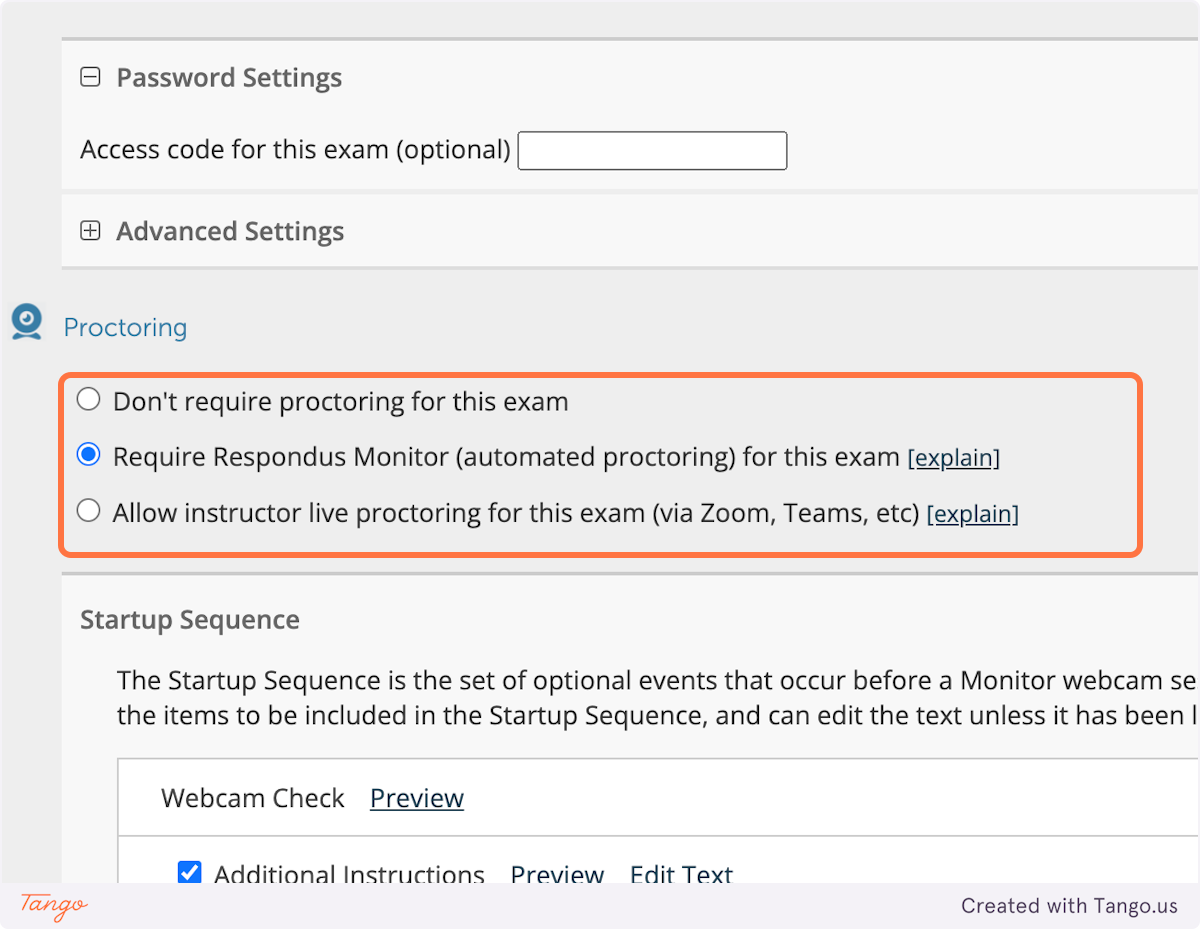
    10. If you would like to require Respondus Monitor, select Require Respondus Monitor (automated proctoring) for this exam

    If you would like to require Respondus Monitor, select Require Respondus Monitor (automated proctoring) for this exam

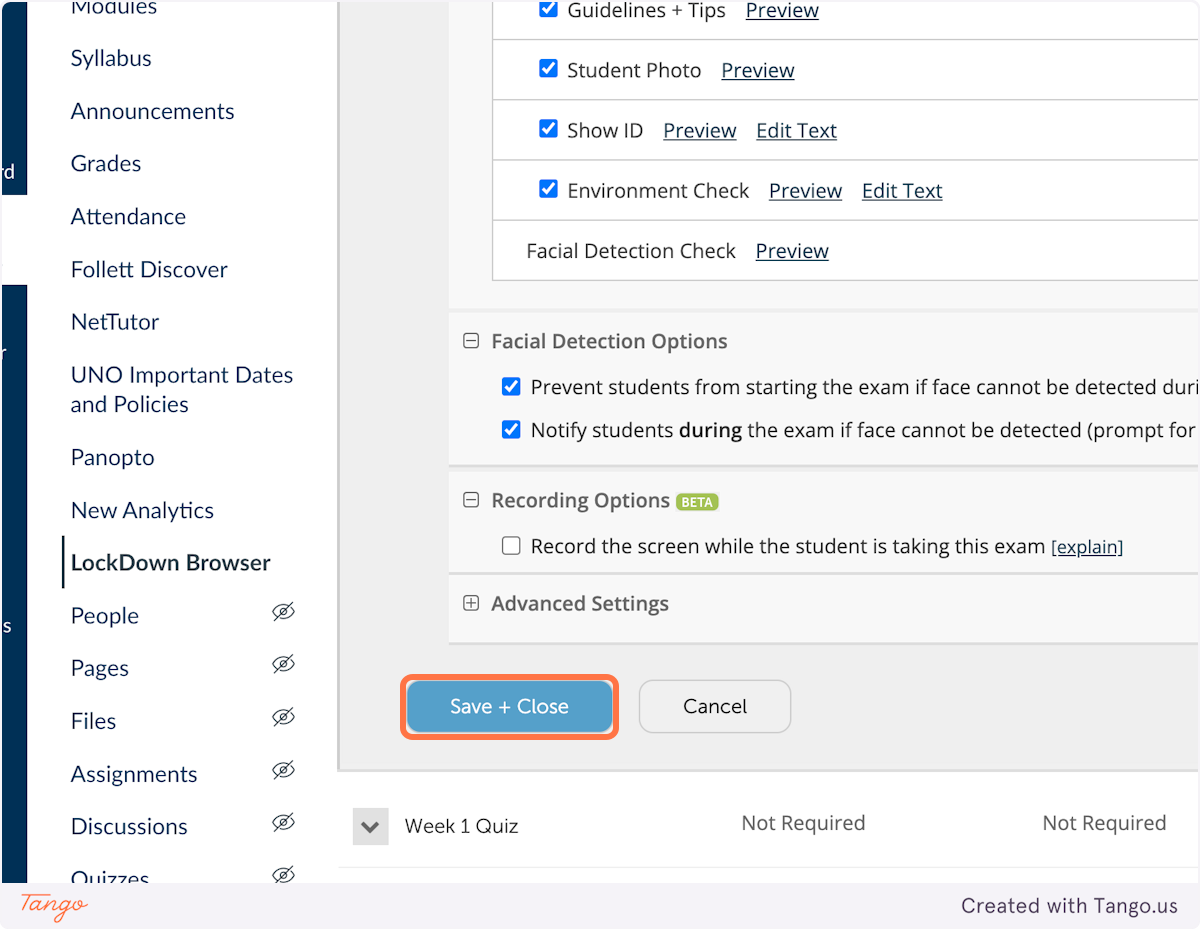
    11. Click on Save + Close

    Click on Save + Close

    12. You have now enabled Respondus LockDown Browser for your quiz

  • How do I Add a TA to my Canvas class?

    Adding a TA in Canvas

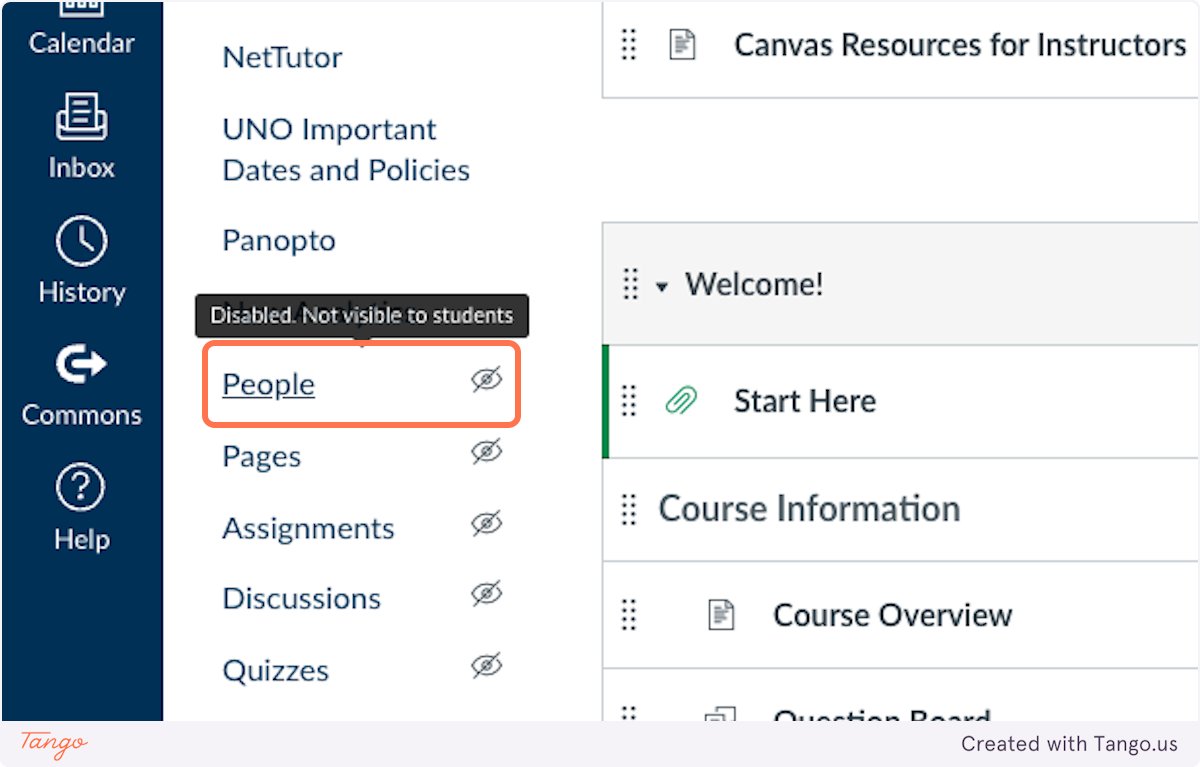
    1. From your Course Navigation, click on People

    From your Course Navigation, click on People

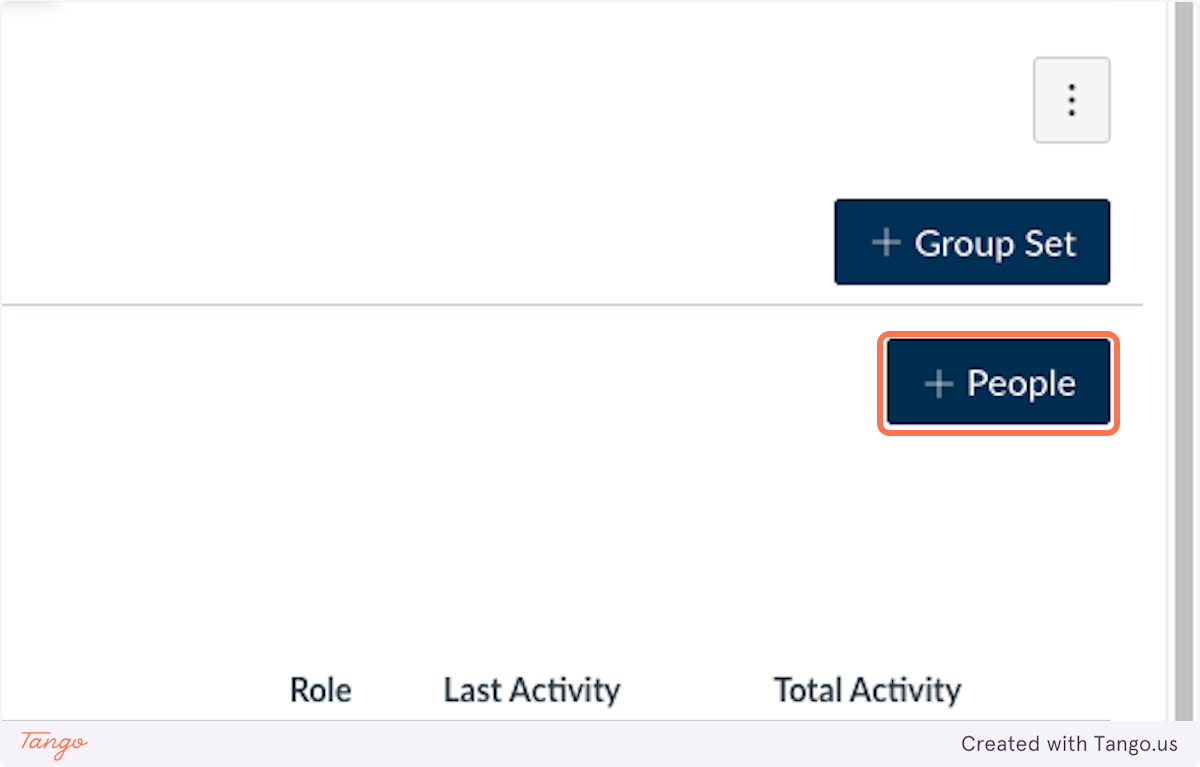
    2. Click on +People

    Click on +People

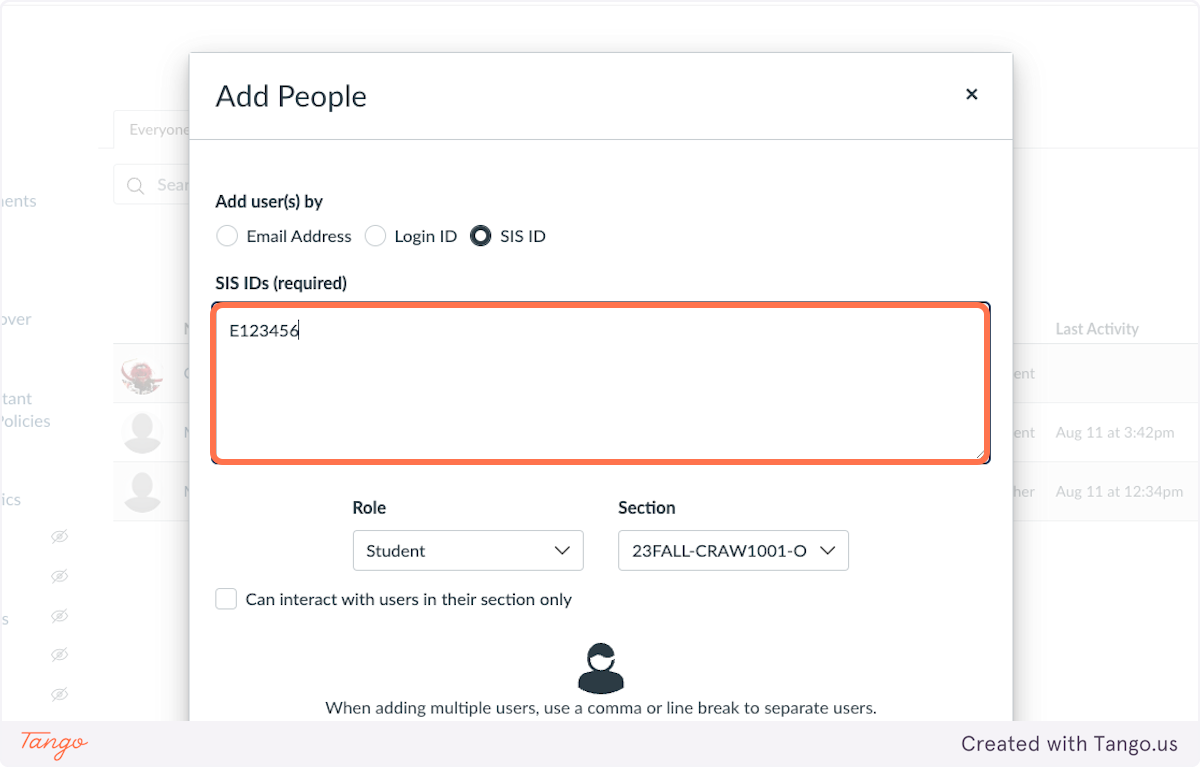
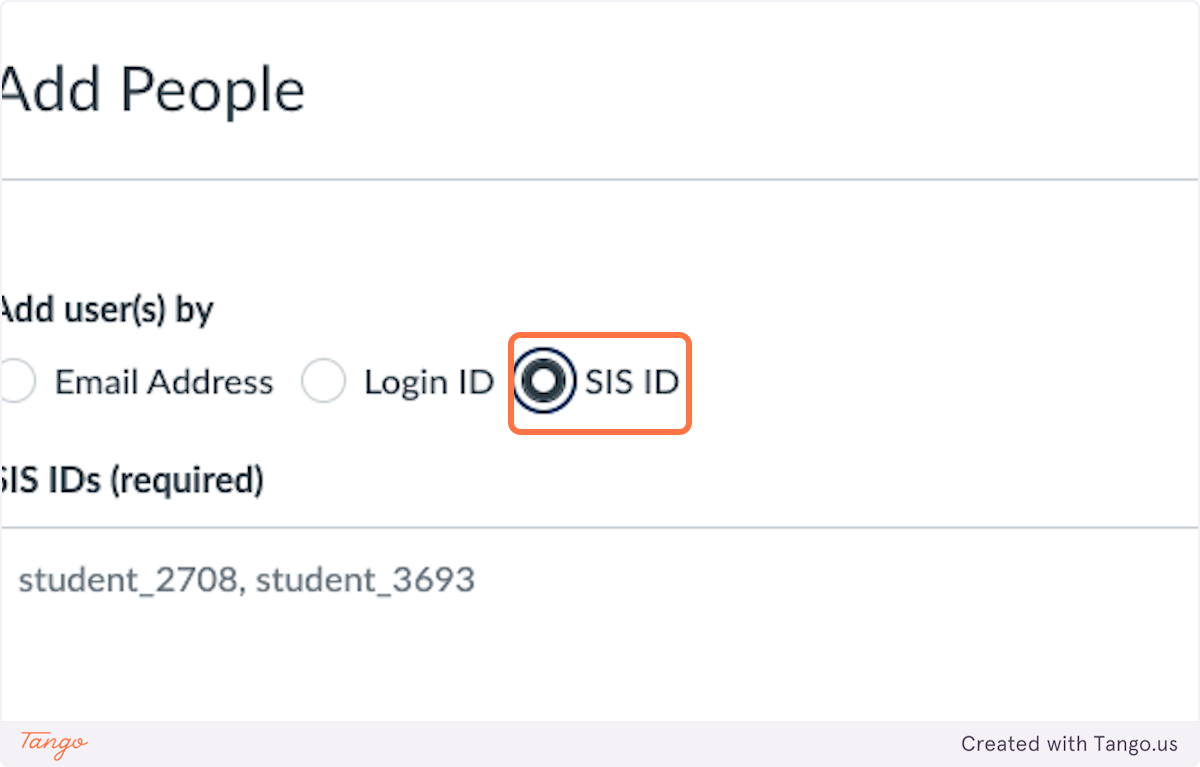
    3. Select SIS ID

    Select SIS ID

    4. Add the students LSU New Orleans ID number with an E in front of it. (For example, E123456)

    Add the students LSU New Orleans ID number with an E in front of it. (For example, E123456)

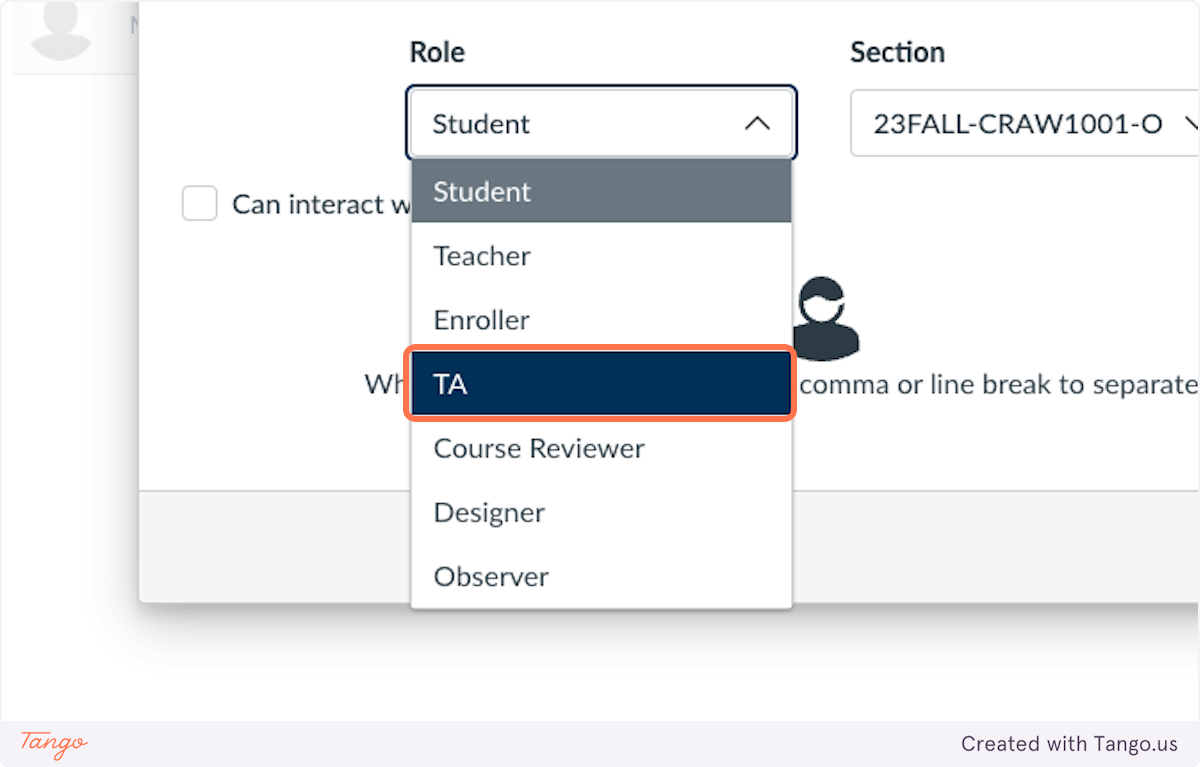
    5. From the Role dropdown, click on TA

    From the Role dropdown, click on TA

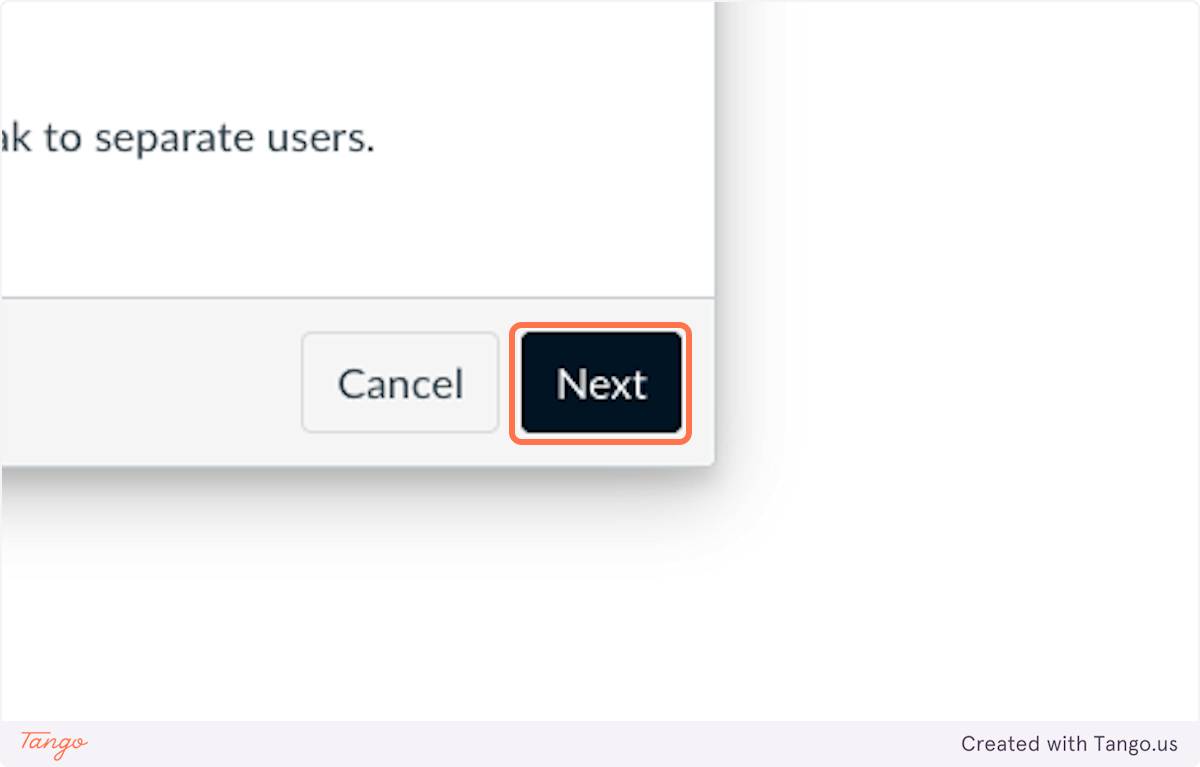
    6. Click on Next

    Click on Next

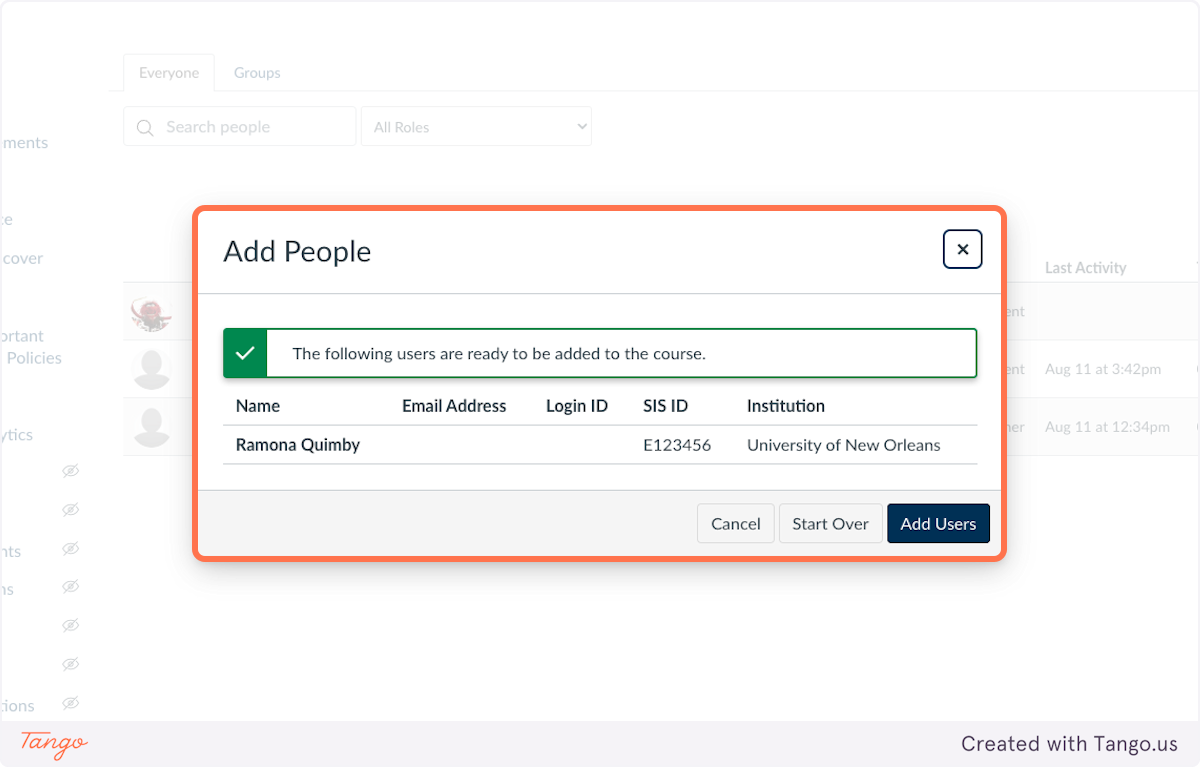
    7. You will see the TAs name and SIS ID

    You will see the TAs name and SIS ID

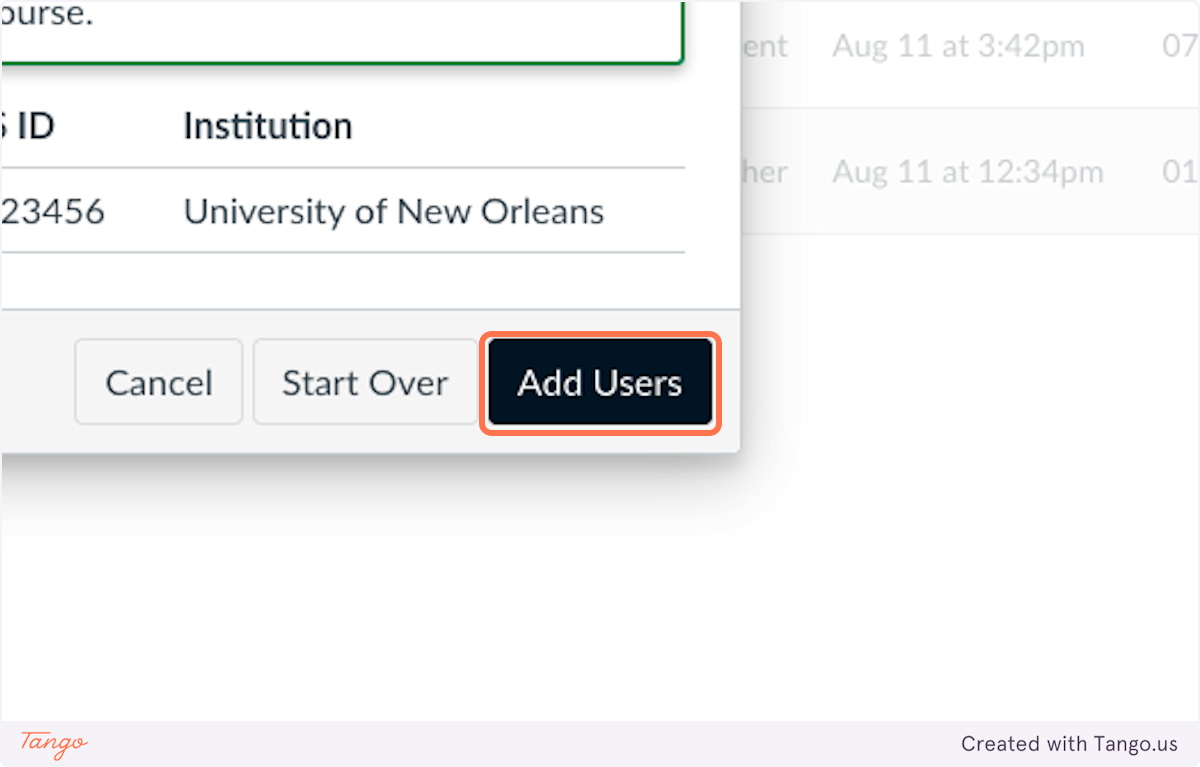
    8. Click on Add Users

    Click on Add Users

    9. If you get the error "We were unable to find matches below." please email [email protected] with your course name as it is written on Canvas and your TAs employee (not student) email and UNOID number.

  • What guides or resources does LSU New Orleans have to help me with Canvas?

    For Faculty

    • LSU New Orleans Canvas QuickStart Guide (you can download the .pdf, but I'm updating the document all the time, so it's probably best to use this as a live link)
    • LSU New Orleans Canvas Training Video Playlist
    • Moodle to Canvas Equivalency Chart
    • White Glove Migrated Equivalency Chart
    • White Glove Migration vs. Moodle Backup Import
    • Copying a Canvas Course to Another Canvas Course (use for sandboxes, master courses, and future semesters.)
    • Importing a Course from Moodle to Canvas (not white gloved migrated)
    • Enabling Respondus LockDown Browser in Canvas
    • Adding a Turnitin Assignment in Canvas

    For Students

    • LSU New Orleans Canvas QuickStart Guide for Students


Footer

Contact
2000 Lakeshore Drive New Orleans, LA 70148
[email protected]
+1 (888) 514-4275
+1 (504) 384-7797

Learn

Admission information
Programs of study
Scholarships and awards
Tuition and fees
Graduate programs
Financial aid
Important dates & deadlines

Experience

International center
Our campus
Student life
Housing
Career services
Alumni
Make a gift
Annual Security Report

Connect

All social
University calendar
News
For parents
Espanol - Tieng Viet
Privacy Policy
Accessibility
Non-Discrimination
Title IX
Campus Crime
Emergency Preparedness
© 2026 LSU New Orleans. All Rights Reserved.