-
Remote Terminal Server
IT provides a terminal server for Faculty/Staff to use for emergencies and away from campus activities. Below are the instructions for connecting to our REMOTE system. Please test all software prior to leaving campus and before an emergency.
Instructions
-
Microsoft System Center Endpoint Protection and Security Essentials
Microsoft System Center Endpoint Protection delivers end-to-end security and access to information through an integrated line of protection, access and identity management products. Security should be a means to a business end. Microsoft is working to deliver business ready security to help companies achieve their business goals while managing risk and helping ensure that the right people always have access to the information they need to get their jobs done.
Microsoft Endpoint Protection is automatically installed on all LSU New Orleans-Domain machines. Once installed, the following icon
 should be visible in the system tray at lower right hand corner of the desktop. If you do not have the icon, or if your machine needs to be added to LSU New Orleans-Domain, please contact the IT Help Desk at 504-280-HELP.
For LSU New Orleans community home machines – Please Download Microsoft Security Essentials.
-
Microsoft Office - (Outlook, Word, Excel, PowerPoint, Access, Lync, Publisher, Project, and Visio)
Microsoft 365 is the most current version of the Office application suite offered by Microsoft. Includes OneNote,MS Word, MS Excel, Outlook 365, MS PowerPoint, and more.
Microsoft Office 365 and Mac Office 365 are now available for installation on LSU New Orleans campus equipment by contacting the IT Help Desk at 504-280-HELP. Previous versions of MS Office is no longer supported.
For LSU New Orleans community home machines – Please log in to myapps.uno.edu and select the "Office 365 Suite" app to take advantage of our site license to install MS Office products.
Installation notes: Before installing MS Office, uninstall any previous editions of Office that you have on your computer, including any trial or starter editions.
-
Microsoft Windows
To have the latest version of Microsoft Windows install on your machine, please call the IT Helpdesk. Please note that Windows XP, Windows 7, Windows 8, and Windows Vista are no longer supported and need to be upgraded as soon as possible.
-
Statistical Package for the Social Sciences (SPSS)
IBM SPSS Statistics is a comprehensive, easy-to-use set of data and predictive analytics tools for business users, analysts and statistical programmers.
Please navigate to software center on your computer to install SPSS on your Windows machine. You can also log in to myapps.uno.edu and select the Virtual Desktop app to access SPSS from any machine and anywhere.
For Home use, please contact the IT Help Desk to request SPSS installation on your computer.
-
Statistical Analysis Software (SAS)
SAS is a sophisticated suite of analytic software components with extensive statistical, graphical, data management, and application development facilities.
Please navigate to software center on your computer to install SAS on your Windows machine. You can also log in to myapps.uno.edu and select the Virtual Desktop app to access SAS from any machine and anywhere.
Software website: http://www.sas.com/
-
Wolfram Mathematica
Mathematica is renowned as the world's ultimate application for computations. But it's much more — it's the only development platform fully integrating computation into complete workflows, moving you seamlessly from initial ideas all the way to deployed individual or enterprise solutions.
To access Mathematica, you have the option to:
- Log in to myapps.uno.edu and select the Virtual Desktop app for access Mathematica from any machine and anywhere.
- Or to install on your personal machine, please submit a request by going to https://www.wolfram.com/siteinfo/.
-
Mathworks Matlab
MATLAB® is a high-level language and interactive environment that enables you to perform computationally intensive tasks faster than with traditional programming languages such as C, C++, and Fortran.
Please contact the IT Helpdesk to have Mathworks installed on your LSU New Orleans on-campus equipment. We are currently using version 2013a.
For off-campus use, please log in to myapps.uno.edu and select the Virtual Desktop app to access Mathematica from any machine and anywhere.
MATLAB website: http://www.mathworks.com/products/?s_tid=brdcrb
-
Qualtrics Online Survey
What is Qualtrics?
It is a web based, research surveying software. The software allows for the creation of online surveys which can be distributed bearing LSU New Orleans logo.
Who is eligible to use Qualtrics?
Qualtrics online survey software is available to LSU New Orleans faculty and staff as well as students, when supervised by faculty, in a class or research setting. Our license allows for unlimited use of the software for LSU New Orleans related research and educational activities. However, it may not be used for non-LSU New Orleans purposes and or commercial business. All survey distribution is subject to current University Institutional Review Board policy which is located at OFFICE OF HUMAN SUBJECTS RESEARCH.
How do I get a Qualtrics account?
To use the software, anyone with a LSU New Orleans email address may access their account through LSU New Orleans myapps portal. This account will be immediately available to create a limited number of surveys, but it will not allow for their distribution. Faculty and staff must contact the help desk at (504)280-HELP or [email protected] to upgrade their account to full access to distribute surveys.
How do I request a Qualtrics account to be updated for my students to conduct research?
If faculty would like upgraded accounts for their students, they may contact the help desk to submit the request. The faculty member must provide the students’ full name, username, student ID number, and the course name (i.e. NAME 1000). The student will receive "coupons" that will allow upgraded access for a period of one semester. Faculty may request a longer duration coupon for doctoral students or other students assisting faculty on a research project. Upon expiration of a coupon, the student account will revert back to limited access which will still allow the student access to the survey and data collected.
What is a coupon and how can my students use it?
A coupon is used to appoint permissions and the amount of time a student has access to Qualtrics to conduct research. A coupon code will be given to faculty, once they have emailed a request to the Help Desk, to give to their students to input when they create their account.
-
Autodesk (3dsMacm, AutoCAD, AutoCAD 3D, AutoCAD MEP, Inventor, Maya, Mechanical, REVIT, Simulation-CFD, Simulation-Mcchanical)
Autodesk Education Master Suite and Autodesk Entertainment Creation Suite Ultimate are available through LSU New Orleans's Virtual Desktop, via myapps.uno.edu, and include our popular and relevant programs for education: AutoCAD, Inventor Professional, Revit, and 3ds Max software.
Category: Design & Drafting
For student use: Please visit the Virtual Desktop app at myapps.uno.edu.
-
Ansys
ANSYS is a general-purpose software, used to simulate interactions of all disciplines of physics, structural, vibration, fluid dynamics, heat transfer, and electromagnetic for engineers.
For use, please log in to myapps.uno.edu and select the Virtual Desktop app to access ANSYS from any machine and anywhere.
-
Adobe (Adobe Reader, Docusign, and Digital Editions)
Adobe has historically focused upon the creation of multimedia and creativity software products, with a more-recent foray towards rich Internet application software development. It is best known for Photoshop, an image editing software. Adobe Reader, the Portable Document Format (PDF) and Adobe Creative Suite, as well as its successor Adobe Creative Cloud.
Pro (pay only no license)
-
Arlequin
Arlequin is a free population genetics software. It performs several types of tests and calculations, including Fst, computing genetic distance, Hardy-Weinberg equilibrium, linkage disequilibrium, mismatch distribution, and pairwise difference tests.
It is currently in version 3.5 and is only available for Windows, though the previous version is still available for Windows, Mac OS X PPC, and Linux
-
ESRI (License Checking)
ArcInfo/ArcGIS from ESRI is the leading family of products for Geographical Information Systems (GIS). Key products available are ArcGIS Desktop (ArcView, ArcEditor, and ArcInfo) and ArcInfo Workstation. Platform support includes Windows, Unix, and Linux.
For use, please log in to myapps.uno.edu and select the Virtual Desktop app to access ESRI from any machine and anywhere.
Category: Geographical GIS
Vendor Information
Vendor: ESRI
Software Website: http://www.esri.com/software/arcgis/arcinfo/index.html
-
FreedomSCI JAWS Talk to Disability Services
The World's Most Popular Screen Reader
JAWS, Job Access With Speech, is the world's most popular screen reader, developed for computer users whose vision loss prevents them from seeing screen content or navigating with a mouse. JAWS provides speech and Braille output for the most popular computer applications on your PC.
Features
- Two multi-lingual synthesizers: Eloquence and Vocalizer Expressive
- Talking Installation
- Built-in free DAISY player and full set of DAISY-formatted basic training books
- Works with Microsoft Office, Internet Explorer, Firefox, and much more
- Supports Windows 8.1 and Windows 10, including touch screens and gestures
- Support for MathML content presented in Internet Explorer that is rendered with MathJax
- Fast information look-up at your fingertips with Research It
- Convenient OCR feature provides access to the text of PDF documents, even those with scanned images that are reported as empty documents by screen readers
- Save time with Skim Reading
- The only Windows screen reader to provide contracted Braille input from your Braille keyboard
- Fully compatible with MAGic, screen magnification software, and OpenBook, scanning and reading program
Advanced Features
- JAWS Tandem available for free to help with support and training
- Optional support for Citrix, Terminal Services, and Remote Desktop
- Powerful scripting language to customize the user experience on any application
- Includes drivers for all popular Braille displays
- Includes voices for over 30 different languages
- Distributed worldwide with local sales and support in most countries
System Requirements
To use JAWS for Windows, you need a personal computer running Microsoft Windows with the following:
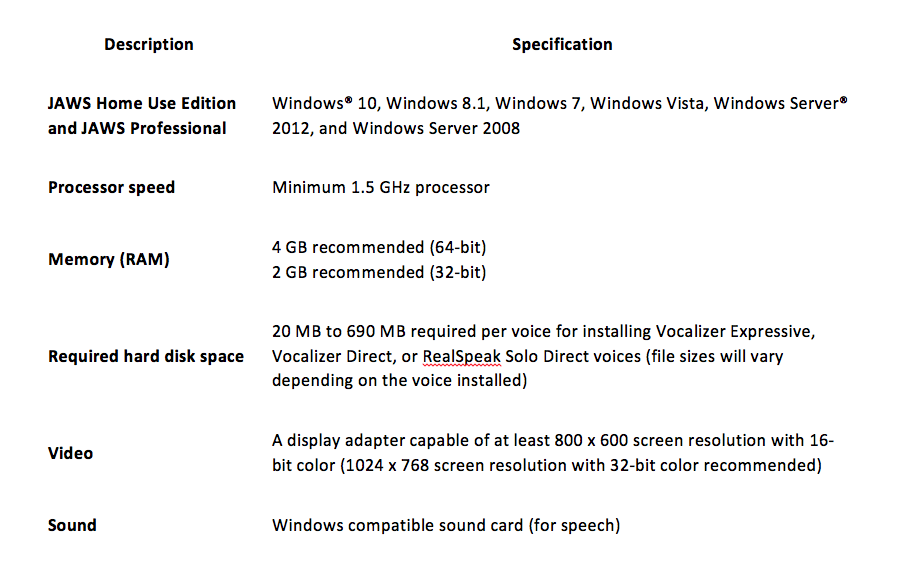
Note: The previous JAWS downloads web page has older versions of JAWS for Windows XP computers.
-
Mega
Mega (Molecular Evolutionary Genetics Analysis) is sophisticated and user-friendly software suite for analyzing DNA and protein sequence data from species and populations.
For use, please log in to myapps.uno.edu and select the Virtual Desktop app to access Mega (Molecular Evolutionary Genetics Analysis) from any machine and anywhere.
Website Info: http://megasoftware.net/
-
OriginLab
Origin is an industry-leading scientific graphing and data analysis software.
OriginLab publishes graphing and data analysis software. Our products provide a comprehensive solution for scientists and engineers who need to analyze, graph, and professionally present data. We have two offices in Massachusetts; our corporate headquarters is located in Northampton and our development office is located in Wellesley Hills. OriginLab also has a subsidiary in Guangzhou China to offer support during business hours in Europe and Asia.
Our main product, Origin, has been growing in popularity among scientists and engineers since 1992. Origin is available in English, German and Japanese and is used in a wide array of corporations, government agencies, colleges and universities worldwide. Along with its easy-to-use graphical interface, Origin offers intuitive, yet powerful, tools for the daily needs of the researcher. Origin's point-and-click interfaces allow you to start using it right out of the box, yet its wide range of advanced features will provide for your growing needs.
Origin is available in many different forms ranging from a single user package to an institution or company-wide site license. In multiple-copy licenses, Origin includes concurrent license management, allowing you to install the software on as many computers as you need. Origin can also be applied as an OEM (Original Equipment Manufacturer) solution for instrument manufacturers.
Our website, www.OriginLab.com, is intended to be an internet resource center, serving the needs of all OriginLab product users, as well as those interested in learning more about what Origin, OriginPro, or the OriginLab File Exchange can do for you. OriginLab encourages you to take advantage of the website as a way to share your custom applications and ideas with the OriginLab user community.
Our online help, www.originlab.com/doc/, is also an excellent source of information about Origin, including tutorials, Quick Help, programming examples, reference information, licensing and installation. Origin is used by 500,000+ registered customers in more than 6,000 companies, 6,500 colleges and universities, and 3,000 government agencies and research labs, worldwide.
-
Populus
The Populus software contains a set of simulations that we use to teach population biology and evolutionary ecology at the University of Minnesota. Simulation models may be chosen from a menu, and students can move among the parameter boxes of an input window, changing initial defaults to values of their own choosing. Most modules offer several graphical outputs of model dynamics, and their computational algorithms are detailed in an Acrobat-based help system packaged with the program.
For use, please log in to myapps.uno.edu and select the Virtual Desktop app to access Populus from any machine and anywhere.
-
R
R is a free software environment for statistical computing and graphics. It compiles and runs on a wide variety of UNIX platforms, Windows and MacOS. To download R, please choose your preferred CRAN mirror. R is a language and environment for statistical computing and graphics. It is a GNU project which is similar to the S language and environment which was developed at Bell Laboratories (formerly AT&T, now Lucent Technologies) by John Chambers and colleagues. R can be considered as a different implementation of S. There are some important differences, but much code written for S runs unaltered under R.
R provides a wide variety of statistical (linear and nonlinear modelling, classical statistical tests, time-series analysis, classification, clustering) and graphical techniques, and is highly extensible. The S language is often the vehicle of choice for research in statistical methodology, and R provides an Open Source route to participation in that activity.
One of R’s strengths is the ease with which well-designed publication-quality plots can be produced, including mathematical symbols and formulae where needed. Great care has been taken over the defaults for the minor design choices in graphics, but the user retains full control.
R is available as Free Software under the terms of the Free Software Foundation’s GNU General Public License in source code form. It compiles and runs on a wide variety of UNIX platforms and similar systems (including FreeBSD and Linux), Windows and MacOS.
For use, please log in to myapps.uno.edu and select the Virtual Desktop app to access R from any machine and anywhere.
-
Vortex
Vortex is a high-fidelity, realtime physics engine developed by CM Labs Simulations that simulates rigid body dynamics, collision detection, contact determination, and dynamic reactions. Vortex adds accurate physical motion and interactions to objects in visual-simulation applications for operator training, mission planning, product concept validation, vehicle and robotics testing, haptics devices, immersive and virtual reality (VR) environments.
The Vortex C++ SDK has several modules that simulate physics-based particles, sensors, floating bodies, cable systems, grasping, and wheeled and tracked vehicles. Developers integrate their projects into 3D visualization frameworks such as OpenSceneGraph (OSG) and Vega Prime, and deploy them in environments that contain software-in-the-loop (SIL), MATLAB, hardware-in-the-loop (HIL), and motion platform components.
For use, please log in to myapps.uno.edu and select the Virtual Desktop app to access Vortex from any machine and anywhere.
-
Center for Research in Security Prices CRSPSift 4.3.13 Professional
CRSPSIFT, CRSP's Security Information Filtering Tool, is CRSP's suite of data access utilities. Efficient and intuitive, the Windows interface provides a central location for four modules:
- TsQuery - Time Series Access for CRSP US Stock, Stock & Index, and CRSP/Compustat Merged Databases
- StkQuery - Event and time series access for CRSP security data, including corporate action history and market data access
- IndQuery - Access to CRSP Index data, including index levels, counts, returns, and weights
- CCMQuery - CRSP/Compustat link history, access to Compustat's industrial and bank files, segment, and PDE data. (Compustat subscribers only)
Website Info: https://www.crsp.org/
-
HEC-HMS HEC-RAS (U.S. Corps of Engineers)
HEC-HMS Software
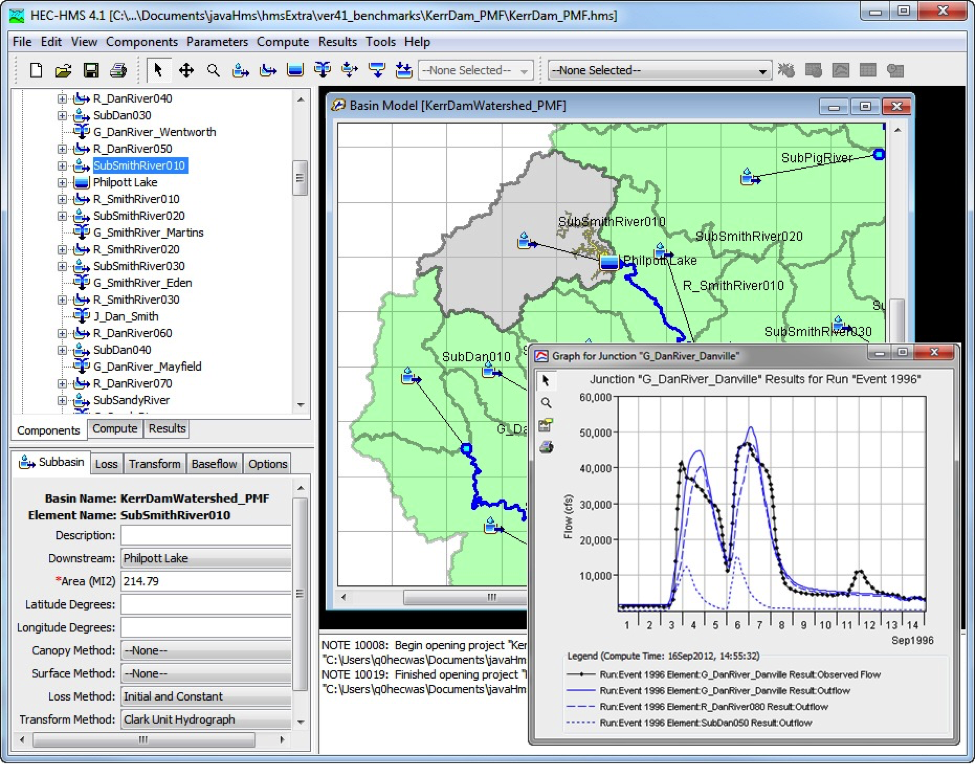
The Hydrologic Modeling System (HEC-HMS) is designed to simulate the complete hydrologic processes of dendritic watershed systems. The software includes many traditional hydrologic analysis procedures such as event infiltration, unit hydrographs, and hydrologic routing. HEC-HMS also includes procedures necessary for continuous simulation including evapo-transpiration, snowmelt, and soil moisture accounting. Advanced capabilities are also provided for gridded runoff simulation using the linear quasi-distributed runoff transform (ModClark). Supplemental analysis tools are provided for model optimization, forecasting streamflow, depth-area reduction, assessing model uncertainty, erosion and sediment transport, and water quality.
The software features a completely integrated work environment including a database, data entry utilities, computation engine, and results reporting tools. A graphical user interface allows the user seamless movement between the different parts of the software. Simulation results are stored in HEC-DSS (Data Storage System) and can be used in conjunction with other software for studies of water availability, metropolitan drainage, flow forecasting, future metropolitanization impact, reservoir spillway design, flood damage reduction, floodplain regulation, and systems operation.
HEC-RAS
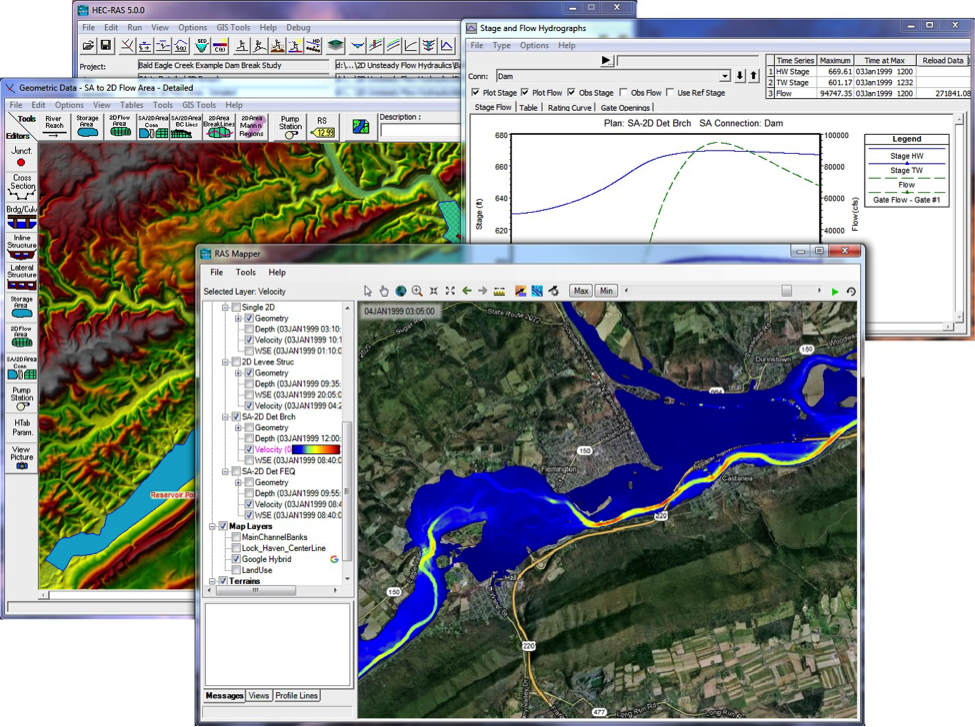
This software allows the user to perform one-dimensional steady flow, one and two-dimensional unsteady flow calculations, sediment transport/mobile bed computations, and water temperature/water quality modeling.
The HEC-RAS website provides a number of resources, which include helping the user download software, learn how to use HEC-RAS, resolve problems, report bugs, and suggest improvements to CEIWR-HEC products and service. Unfortunately, CEIWR-HEC is unable to provide phone or email technical support to non-USACE customers. However, CEIWR-HEC does encourage anyone who finds an issue with CEIWR-HEC software, to please report that issue through the HEC-RAS Bug Report page. Also, please review CEIWR-HEC's Support Policy page for further details.
For use, please log in to myapps.uno.edu and select the Virtual Desktop app to access HEC-HMS from any machine and anywhere.
-
Pipe-Flo
PIPE-FLO® is designed to optimize and troubleshoot new or existing fluid piping systems. With a rich set of features and tools, PIPE-FLO® offers a variety of ways to view and analyze your fluid systems. The modeling interface is easy to use allowing designers, engineers and operators to advance productivity. Now you can reduce design time and avoid costly errors by eliminating the need for complex spreadsheets.
Highlights
- Design new systems, plan expansions and manage startups, shutdowns and plant turnovers
- Model entire piping systems or design individual pipelines using the built-in drawing tools
- Document and optimize existing operations with a robust set of modeling features
- Simulate abnormal conditions to troubleshoot, anticipate and avert emergencies
- Store any number of operating and hypothetical scenarios for the system
- Calculate pressures, flow rates, choked flow, inlet and differential pressure on valves, total head and NPSHa on pumps
- Select pumps from Engineered Software, Inc.'s PUMP-FLO database
- Size pumps, pipes and control valves
- Clearly visualize and share important piping system parameters
Website Info: https://pipe-flo.com
-
Trane (Trace 700, System Analyzer, Engineering Toolbox)
Trace 700
As a systems and services provider, we understand the challenges of designing the most efficient, lowest cost HVAC system solution. That’s why we developed Trane Air Conditioning Economics, or TRACE™—an award-winning design-and-analysis software program that helps HVAC professionals optimize the design of a building’s heating, ventilating and air-conditioning system based on energy utilization and life-cycle cost.
TRACE 700 helps you compare the energy and economic impact of building-related selections such as architectural features, HVAC systems, HVAC equipment, building utilization or scheduling, and financial options.
System Analyzer
System Analyzer is a comparative analysis tool for preliminary evaluations of HVAC systems based on energy and economic performance. Use it to quickly evaluate virtually any combination of air distribution system(s) and cooling/heating equipment for a specific building type and weather location.
The intuitive reports and graphs help you evaluate the benefits of prospective system designs, which systems might be appropriate for an initial design, or to get a general idea of how one system-and-equipment combination performs when compared with another.
For use, please log in to myapps.uno.edu and select the Virtual Desktop app to access Trace Analyzer from any machine and anywhere.
-
Solidworks
Dassault Systèmes SOLIDWORKS Corp. offers complete 3D software tools that let you create, simulate, publish, and manage your data. SOLIDWORKS products are easy to learn and use, and work together to help you design products better, faster, and more cost-effectively. The SOLIDWORKS focus on ease-of-use allows more engineers, designers and other technology professionals than ever before to take advantage of 3D in bringing their designs to life.
For use, please log in to myapps.uno.edu and select the Virtual Desktop app to access SOLIDWORKS from any machine and anywhere.
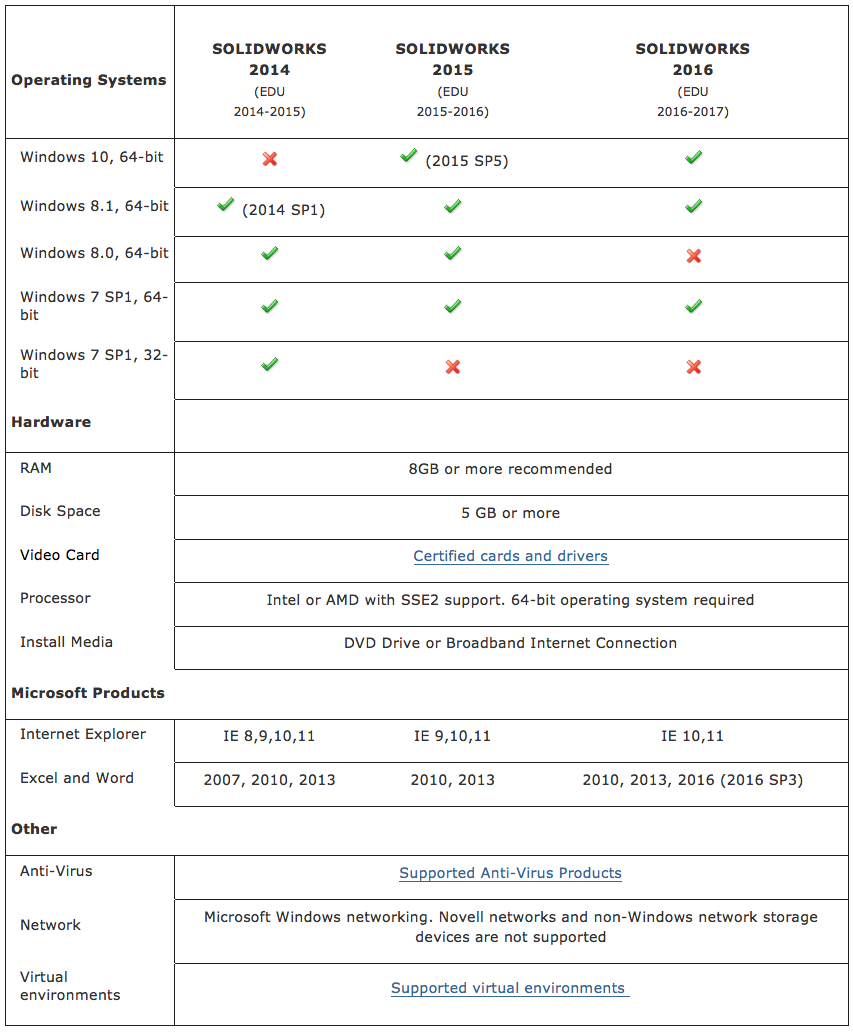
Use this information to ensure you are always working with a SOLIDWORKS supported and optimized system for hardware, operating system and Microsoft products.
-
Stata
Stata is an extensible, integrated, interactive statistical package that provides tools for data analysis, data management and graphics.
Category: Statistical
Vendor Information
Vendor: Stata
Software Website: http://www.stata.com/
For use, please log in to myapps.uno.edu and select the Virtual Desktop app to access Stata from any machine and anywhere.
-
Microsoft Office365
Designed to help students and teachers work together in exciting ways, this global offering provides eligible customers with access to Microsoft Office 365, best-in-class cloud-based productivity and collaboration tools.
Category: Business
Vendor Information
Vendor: Dell
Software Website: https://products.office.com/en-us/academic/office-365-education-plan
Product Use Rights
Terms of Use: Office365 is available for free to faculty, staff and students who are currently working at or attending an academic institution and allows installation of the full Office applications on up to 5 PC’s or Macs for free.
Faculty/Staf Home Use: Office365 is a cloud service accessible from anywhere.
Availability
Office365 is available to all current faculty, staff and students at no cost. Log in information and instructions can be found here: http://myapps.uno.edu
Contact
Students should contact the ITS Help Desk at [email protected].
LSU New Orleans Faculty and staff should contact Microsoft directly at https://support.office.com/.